Need home internet fast—but fiber is taking too long?
Setting up traditional fiber internet in Japan can mean long wait times, weekday appointments, and even construction work inside your apartment. Depending on where you live, it might take up to 2 months beofre you're online.
That's where SoftBank Air can come in. It's a no-installation home wiFi solution that skips the contructions, works out of the box, and gets you connecteed in just a few days.
In this SoftBank Air review, we'll break down what it is, how it compares to fiber, what real users are saying—and what alternatives are available for foreigners in Japan.

Related Article:
Are you looking for home internet in Japan? Do you need English customer support. Check out the top 7 internet providers in Japan here!
Compare the Top 7 Internet Providers in Japan | Best Plans with English Support
- What is SoftBank Air?
- Plans & Pricing
- Speeds & Data Limits
- Coverage & Availability
- Application & Installation
- Language & English Support
- Real User SoftBank Reviews
- Who Should Use SoftBank Air (And Who Shouldn't)
- Summary: Pros & Cons of SoftBank Air
- If You Need High-Speed, Unlimited Internet as an International Resident in Japan
Sakura Mobile is loved by many international residents in Japan
- Unlimited 4G/5G connection
- Plug-and-play device
- No installation or construction required.
- Full English support 7 days a week.
- Trusted by 400,000 users
What is SoftBank Air?
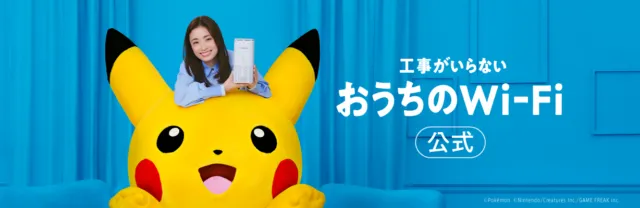
SoftBank Air is a plug-and-play home internet service from SoftBank. They provide a WiFi router (Air Terminal) that does not need any construction work or installation. Their oruter connects to their mobile network, just likea cell phone.
They market it as a hassle-free solution for those who want home itnernet without all the costs, waiting, and planning that come along with construction and regular fiber-optic home internet.
Once you sign up with SoftBank Air's service, they will send you a router. All you have to do is plug it into an outlet and you'll be able to connect to the internet on the same day that it arrives!
SoftBank Air At a Glance
| URL | https://www.softbank.jp/internet/air/ |
| Plans and Pricing (tax incl.) | Initial Fees (Registration fee)
Monthly fees
|
| Maximum Connection Speed | Air Terminal 5/6: 2.7 Gbps |
| Average Connection Speed | Download: 151.69 Mbps Upload: 14.42 Mbps |
| Allocated Data | Unlimited |
| Minimum Contract Length | Typically, 2 years (If you cancel before the installment payments are finished, you will have to finish paying it off in a lumpsum. |
| English Support | Both website and customer service available in Japanese only |
| Covered Area | 99% of the populated area of Japan |
| # of installations | 0 |
Plans & Pricing
| Plan | Monthly Price | Initial Fee | Installment Term | Notes |
| *Dedicated Terminal Purchase | 4,950 JPY/month (months 1-48) 5,368 JPY/month (from month 49) | 3,300 JPY | 48 months (default) | Total device cost: 71,280 JPY You can choose 12-60-month installments or pay in full. |
| Dedicated Terminal Rental | 5,970 JPY | 3,300 JPY | none | Rental availability only for older models (not 5G-capable Air Terminal 6) |
Payment Flexibility:
- Installment Options for Purchase12 / 24 / 36 / 48 / 60 months – or pay in a lump sum.
- Total Purchase Price:71,280 JPY (regardless of number of installments).
Monthly payment amount will vary based on the term length.
Speeds & Data Limits
| Router | Connection Type | Max Download (Theoretical) | Max Upload (Theoretical) | Avg. Download (Actual) | Avg. Upload (Actual) |
| SoftBank Air Terminal 4 Next | 4G | 612 Mbps | 612 Mbps | 66.7 Mbps | 13.67 Mbps |
| SoftBank Air Terminal 5 | 4G/5G | 2.1 Gbps | 2.1 Gbps | 164.46 Mbps | 14.18 Mbps |
| SoftBank Air Terminal 6 | 5G/4G | 2.7 Gbps | 2.7 Gbps | 176.68 Mbps | 21.46 Mbps |
| Sakura Mobile Home WiFi | 5G/4G | 2.5 Gbps | 2.5 Gbps | 124.15 Mbps | 18.61 Mbps |
| Sakura Fiber Internet | Fiber optic | 1 Gpbs 10 Gbps | 1 Gbps 10 Gbps | 367.11 Mbps | 275.81 Mbps |
Average connection speeds are recorded on the website minsoku on January 27, 2026.
SoftBank Air is easy to set up, but if you're working remotely, gaming or streaming in 4K, fiber is the better choice.
💡Try Sakura Fiber Internet
Fast, stable, and fully support in English—powered by NTT FLET'S Hikari
The table below shows common online activities and the interenet speeds typically required for each.
| Activity | Recommended Speed |
| 4K Video Streaming/Online Gaming | 25 Mbps |
| Online Meetings | 10 Mbps |
| HD Video Streaming (1080p) | 5 Mbps |
| Web Browsing/Emails/Messaging Apps | 1 Mbps |
Coverage & Availability
SoftBank Air runs off SoftBank's 4G/5G network, offering wide coverage across most of Japan's cities and suburbs.
Urban vs Rural Areas
Coverage is generally strong in populated areas, thanks to SoftBank's mid-band LTE and growing 5G network. However, in rural or mountainous regions, indoor reception may be weaker—especially since SoftBank no longer uses the 900 MHz band for Air, which helped with building penetration.
If you live in a major city or suburban area, SoftBank Air is likely to work well. But if you're in a remote location, performance may be less consistent.
How to Check Availability
Before applying, we recommend checking service availability at your exact address:
- Address-Based Speed Map:See the estimatd top speed and available netowrk type (4G or 5G).
- 5G Area List:Confirm if your area qualifies for the latest Air Terminal 6 Speeds (up to 2.7 Gbps).

📌You can also visit a SoftBank or Y!mobile store to check availability and ask about coverage at your home.
Application & Installation
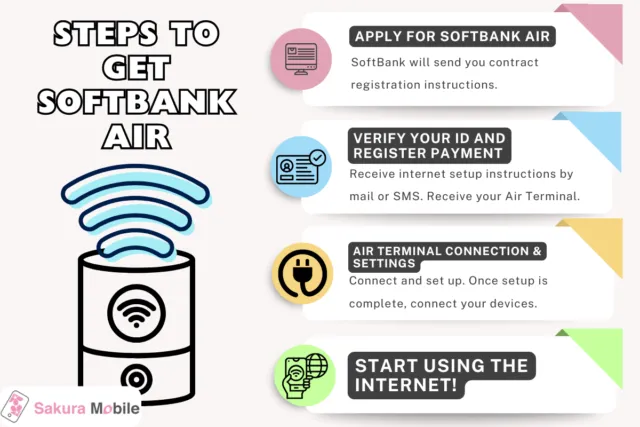
SoftBank Air is relatively easy to install compared to traditional fiber intenret, but process may still present some challenges—especially if you don't speak Japanese.
Simple Plug-in Setup
SoftBank Air does not require a technician visit or home construction. Once the Air Terminal router arrives, just plug it into a power outlet. It connects automatically to the SoftBank netowrk, and your WiFI should be available within a few minutes.
Shipping & Timeline
- In-store sign-up: You may be able to take the device home immediately, depending on stock.
- Online or phone application: The router typically arrives within two business days. (Delivery may take longer if it falls over a weekend.)
- You'll also receive a "Start Notice" via mail or SMS with your account details about a week after applying.
Application Process:
You can apply through:
- The SoftBank website (Japanese only)
- Phone (Japanese only)
- SoftBank/Y!mobile stores (English may be available, but varies depending on the store).
To apply, you'll need:
- Japanese Driver's license, Japanese passport, My Number Card, or Residence card + foreign passport or special permanent resident certificate.
- Credit card or cash card to process your payment.
- A person who is fluent in Japanese as all application steps, forms,a nd support are conducted in Japanese.
- ✅No long-term contracts
- ✅Full English support
- ✅Plug-and-play setup
Just 3 steps:
- Apply in English
- Get your device
- Plug in & Go!
Language & English Support
SoftBank Air is mainly a Japanese-language service, and official English resources are extremely limited. While there is a brief English overview on SoftBank's website, all detailed pages, contracts, manuals and application forms are written in Japanese.
Application Process
Whether applying online, by phone, or in-store, the process is conducted in Japanese. For this reason, many international residents need help form a Japanese-speaking friend or choose to apply through a third-party agency that offers English support. Another thing to beware of is required documents typically include a residence card and other forms of ID.
Customer Support
SoftBank does offer an English-language phone line for general inquires. However, this support is limited—agents may not be able to help with specific troubleshooting or billing issues related to SoftBank Air. Thee is no official English email or chat support available.
Sakura Mobile's Home WiFi offers hassle-free internet with easy setup—no installation needed, perfect for short0term residents or frequent movers.
- ✅Enjoy reliable coverage and stable speeeds powered by Japan's top networks.
- ✅Get full English-speaking customer support every step of the way.
- ✅Ideal for everyday streaming, browsing, and casual gaming with no long-term contracts.
Real User SoftBank Reviews
SoftBank Air reviews vary widely between very satisfied and very disappointed, depending on user expectations and environment.
Positive
Performance Praise
"Today I changed from Y!mobile Pocket WiFi to the new SoftBank Air...This one is faster..."
Device Switch, Promo Offer
"SoftBank Air Terminal 6 has pretty fast connection❗You can comfortably use it for work or watch videos at home😄"
Negative
Speed/Reliability Issues
"SoftBank Air is ridiculously slow...!?...pages still won't load...Might be time to seriously think about other solutions?"
Customer Churn Risk
"I haven't posted recently because it's been so bad...Current situation..."
Strong Warning with Alternative Recommendation
"I've written this many times, but I regret signing up for SoftBank Air...I recommend wired optical fiber...you'll definitely get annoyed!"
Who Should Use SoftBank Air (And Who Shouldn't)
SoftBank Air isn't the perfect fit for everyone, but given the right situation, it can be a convenient solution.
✅SoftBank Air May Be a Fit If You:
- 🧳Are a renter of a short-term resident who can't install fiber.
- ⚡Need internet immediately and are okay with occasional slowdowns.
- 🚫Live in a place without fiber access or just need a temporary bakcup option.
❌SoftBank May Not Be Ideal For:
- 🎮Gamers or remote workers who need low latency and reliable high-speed internet.
- 🏠Large households iwth many devices or heavy data usage.
- 🌐International residents who prefer English-language customer support.
- 📉Anyone looking for long-term speed and reliability (fiber is the better fit).

Tip: If you're unsure, try a flexible solution, like Sakura Mobile Home WiFi first. You can always upgrade to fiber later if needed.
Summary: Pros & Cons of SoftBank Air
Pros of SoftBank Air:
- Quick SetupNo installation delay—internet can start within days of applying, or immediately in-store.
- No ConstructionNo need to coordinate with building management or wait for cable laying. Simply plug it into an outlet.
- Unlimited DataUnlimited usage for a flat fee.
Cons fo SoftBank Air
- Slow SpeedsAir Terminal 6's 2.7 Gbps max speed is theoretical, and speeds are often much slower than fiber. Latency is also higher, so online gaming or video calls can suffer.
- Signal LimitationsSoftBank Air uses mid-band LTE/5G (no 900MHz), so walls and distance can degrade signal. Coverage depends on the nearest cell tower, indoor placement, and weather.
- Peak-Time ThrottlingAs a shared mobile network, speeds can dip during busy hours.
- Language BarrierNo English support/documentation is offered. Foreign residents may find it harder to sign up or troubleshoot SoftBank Air cimpared to other providers that offer English service.
If You Need High-Speed, Unlimited Internet as an International Resident in Japan
If you’re an international resident looking for fast, unlimited internet in Japan, Sakura Mobile has two great options—both with full English support and no long-term contracts.
Sakura Fiber Internet
Perfect for long-term residents who need maximum speed and stability.
- High-speed NTT FLET'S Hikari network (1 Gbps/10 Gbps options).
- No binding contract, no cancellation fees.
- Full English support (365 days a year).
- Free router + modem included.
- Simple online signup—no Japanese required.
- Trusted by 400,000+ users.
Starts at 6,480 JPY/month
Need Flexibility? Try Sakura Mobile’s Home WiFi
If you're staying short-term or move frequently, Sakura Mobile Home WiFi is a hassle-free solution.
- Fast 5G/4G home WiFi—just plug it in.
- No installation or construction required.
- Delivered to your door.
- Full English support every step of the way.
Starts at 6,480 JPY/month