If you're a Mint Mobile user planning a trip to Tokyo or anywhere else in Japan, you've probably asked yourself one simple question: does Mint Mobile work in Japan?
The short answer is yes. Mint Mobile's Minternational Pass works in Japan. But working and working well are not the same.
When you arrive at airports like Narita International Airport or Haneda Airport, you'll need reliable data right away—for maps, trains, translations, and messaging. Mint Mobile can keep you connected at a basic level, but limited high-speed data and slower speeds can make everyday travel tasks harder than expected.
This guide explains how Mint Mobile really performs in Japan—so you can avoid slow connections and stay online when it matters most.
TL;DR
Yes, Mint Mobile works in Japan with the Minternational Pass—but it's only a good fit for short trips.
Mint Mobile Limitations in Japan:
- Hard Data Caps: Maxes out at 1 GB of high-speed data per day.
- Severe Throttling: Speeds drop to an unusable 128 Kbps once the cap is hit.
- High Lag: Data routing to other countries causes noticeable delays.
- No Pay-As-You-Go: Running out of data means buying a brand-new pass and losing the remaining value of your current pass.
For 1–2 days, it's a simple way to stay connected without changing your SIM. But for longer trips, high-speed data runs out quickly, speeds slow down, and total costs increase.
Quick Recommendations:
| Duration | Recommendation |
|---|---|
| 1–2 Days | Mint Mobile Minternational Pass |
| 3+ Days / Heavy Data | Local Japan eSIM (e.g., Sakura Mobile) |
Ensure your connection is rock-solid from the moment you land.
- TL;DR
- How Mint Mobile Roaming Works in Japan
- The Data Reality Check: Is 1 GB/Day Enough?
- The Real Cost: Mint Mobile vs. Unlimited Data in Japan
- Avoiding the "Double Bill"
- Why Sakura Mobile Outperforms Mint Mobile Japan Roaming
- Pre-Trip Checklist: Make Sure Your Phone Works in Japan
- Mint Mobile FAQ
- Enjoy Your Trip to Japan
How Mint Mobile Roaming Works in Japan
Mint Mobile users T-Mobile's roaming network in Japan. When you arrive, your phone will usually connect to local networks, like SoftBank or NTT docomo.
In big cities, like Tokyo and Osaka, SoftBank often delivers fast speeds, including 5G in many areas. NTT docomo is known for strong and stable coverage, especially outside cities like rural towns or mountain areas.
Bottom line: Coverage is good, but speed and quality can vary by location.
The "Minternational Pass" Breakdown
Mint Mobile offers three roaming plans for use in Japan:
- $5 (1-Day): 1 GB high-speed data, 60 min talk, 60 texts
- $10 (3-Day): 3 GB high-speed data, 200 min talk, 200 texts
- $20 (10-Day): 10 GB high-speed data, 500 min talk, 500 texts

No Pay-As-You-Go
If you run out of data, you must buy a new pass—and your current one ends right away.
Result: Extra cost + wasted time.
The Data Reality Check: Is 1 GB/Day Enough?
It is a common trap to think 1 GB is plenty. But let's look at the math of modern travel.
Why Your Data Disappears
- Google Maps: In a city like Tokyo, you are constantly using location services, which require high-frequency to the server. This isn't just downloading a map once. It's a constant stream of high-data, high-latency interaction.
- Social Media: Instagram, TikTok, and Snapchat are designed to pre-load high-definition video. Scrolling for 20 minutes can easily consume 200–500 MB of data.
- Translation & Transit: Apps like Google Lens or Japan Transit tools require consistent, reliable, and fast connections to provide real-time information.
| Activity | Data Usage | Impact on 1 GB Limit |
|---|---|---|
| Google Maps (Live) | 15–20 MB/hour | Moderate; essential for Tokyo's vertical cities |
| Translation (Camera Mode) | 30 MB/hour | High; essential for reading menus and signs |
| Instagram/TikTok Scrolling | 150–300 MB/hour | Severe; 1 GB can disappear in just 20 minutes |
| Video Calls (FaceTime/WhatsApp) | 200–540 MB/hour | Very High; exhausts daily allotments |
The "Throttling" Reality
Once you hit your high-speed cap, Mint Mobile throttles your connection to 128 Kbps. At these speeds, Google Maps becomes virtually unusable, often fails to load the map tiles or search results needed for transit.
The Real Cost: Mint Mobile vs. Unlimited Data in Japan
If you're traveling in Japan for 10 days, Mint Mobile may look cheap at first. But once you start using data, the total cost can rise fast.
10-Day Trip Example
| Plan | Price (10-Days) | High-Speed Data | Experience |
|---|---|---|---|
| Mint Mobile | 20–40 USD | 10–20 GB | Can slow down quickly |
| Sakura Mobile 5G eSIM | 6,600 JPY (~42 USD) | Unlimited | No slowdowns, no matter how much you use |
Result: For a similar price, you can get more data and no slowdowns with Sakura Mobile.
Avoiding the "Double Bill"
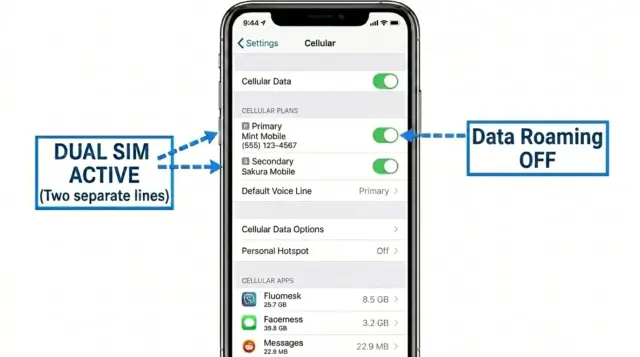
You don't need to choose your U.S. number and local reliability. Use the configuration to get the best of both worlds:
- Keep Mint Active (Primary Line): Keep your Mint Mobile SIM enabled for Voice/SMS to ensure you receive essential 2FA banking codes.
- Disable Data Roaming: Go to your cellular settings and turn OFF data roaming for the Mint Mobile line to prevent unexpected charges.
- Set Local eSIM as Data Source: Install your Sakura Mobile eSIM and set it as your Primary Cellular Data line.
Why Sakura Mobile Outperforms Mint Mobile Japan Roaming
While roaming passes like Mint Mobile technically work, local eSIMs are built for the reality of Japanese travel. By connecting directly to domestic infrastructure, Sakura Mobile eliminates the throttling, lag, and hidden limits of international roaming.
Faster Speeds on Local 5G Networks
Local SIMs and eSIMs connect directly to major Japanese networks—specifically NTT docomo (4G LTE) and au (5G). Because Sakura mobile operates locally on these networks, users receive higher priority than roaming users.
- The 5G Advantage: Sakura Mobile's 5G plans run on au's premium network (bands n77, n78), offering high-speed data without strict daily limits. This means more consistent speeds for maps, video, and daily use.
- What this means in real life: In busy areas like Shinjuku Station or Shibuya Crossing, local users usually keep fast, stable connections. Roaming users are more likely to be slowed down when the network is crowded.
Lower Lag (Faster Response Times)
With roaming, your data often takes a longer path—sometimes going from Japan to another country and back before loading anything. This adds delay and slows everything down.
Local eSIMs connect directly in Japan, so the response time is much faster. Roaming can exceed 200ms latency, while local eSIMs are usually under 50ms.
What this means in real use:
Apps like Google Maps, train schedules, and video calls load faster and feel smoother.
Easy Setup + Full English Support
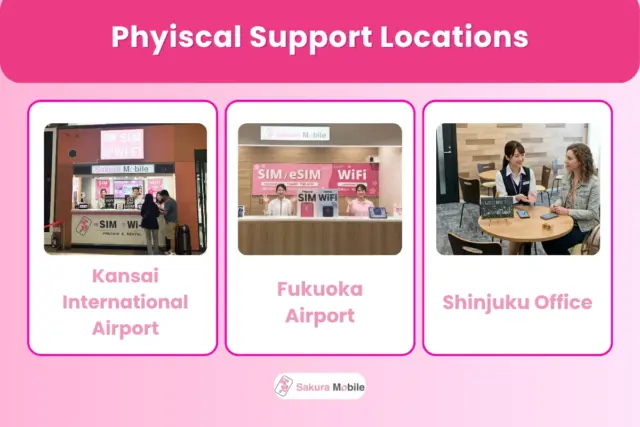
Getting connected in Japan is simple with a local provider like Sakura Mobile.
- Fast Setup: Buy your eSIM online before your trip and activate it with a QR code in minutes, or pick up a physical SIM at the airport or have it delivered to your hotel. No complicated setup or paperwork.
- English Support: Get real help (not just chatbots) through live chat, email, or phone. There's even in-person support in Tokyo and at Fukuoka and Kansai airports.
More Reliable Backup Options
Not all phones support eSIM. If your device is locked or older, you still have options.
In the unlikely event that your phone turns out to be incompatible, customers with Compatibility Insurance can upgrade to a Pocket WiFi device. This provides a simple backup plan so you can stay connected in Japan without interruption.
Pre-Trip Checklist: Make Sure Your Phone Works in Japan
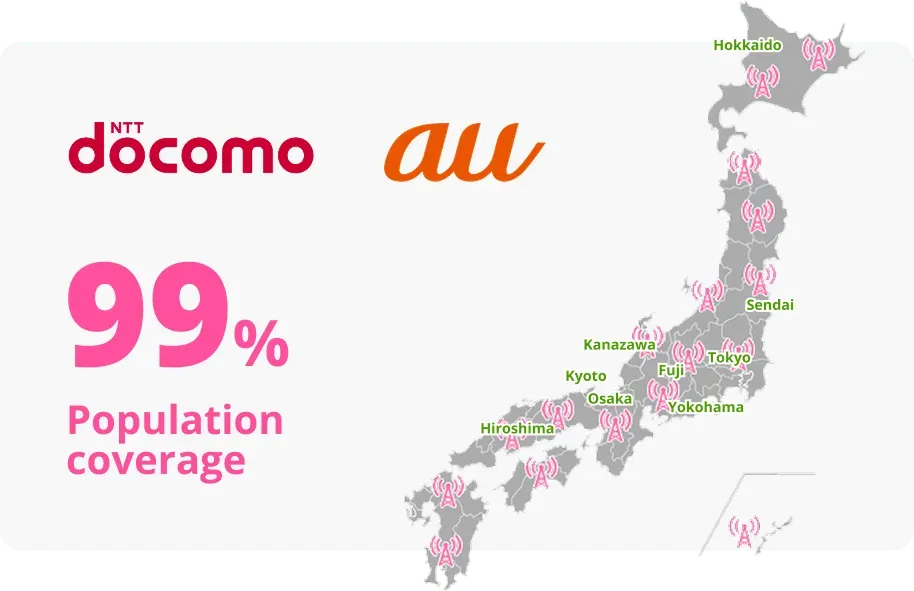
Before you fly to Japan, check these key items to avoid connection problems when you land.
- Unlock your phone: Ensure your device is carrier-unlocked so it can accept a foreign eSIM.
- Check network compatibility: Make sure your phone supports Japan's main network bands.
Make sure your phone supports Japan's main network bands:
| Band | Frequency | Bands | Importance |
|---|---|---|---|
| 4G Band 1 | 2100 MHz | docomo, au, SoftBank | Standard urban coverage across all carriers. |
| 4G Band 18, 19 | 800 MHz | au (B18), docomo (B19) | Important for rural areas, mountains, and indoor signals. |
| 5G n77, n78 | 4.0/3.7 GHz | docomo, au, SoftBank | Standard 5G bands in Japan for high-speed connectivity. |

💡 Tip: Doing these steps early helps you avoid delays, no-signal issues, or setup stress at the airport.
Mint Mobile FAQ
- Q: Can I keep my Mint Mobile number for iMessage?
A: Yes. If your phone supports dual SIM, you can keep your Mint Mobile line for calls and texts while using a local eSIM for data. Your iMessage will stay linked to your U.S. number.
- Q: Does WiFi calling work in Japan?
A: Yes. If you turn on WiFi calling before leaving the U.S., you can call U.S. numbers using WiFi or your eSIM data connection.
- Q: What is the best alternative to Mint Mobile in Japan?
A: If you need more data and better speeds, local eSIMs are usually the best choice. Options like Sakura Mobile use Japanese networks, which means faster and more stable service.
FAQ
Enjoy Your Trip to Japan

Mint Mobile works in Japan, but it's best for short trips or light use only. Limited high-speed data and slower speeds after throttling make it hard to rely on for daily travel.
For most travelers, a local Japan eSIM is the better choice. It offers faster speeds, more data, and more reliable connection across Japan.
Bottom line:
- Mint Mobile = basic, short term use
- Sakura Mobile = full-speed, everyday travel