
Application procedure for Monthly Pocket WiFi and Home WiFi

Order online

Delivery or pickup
counter & receive

Set up & start
Prerequisite

Email address
Important notices will be sent via email. Ensure your email account can receive emails from Sakura Mobile (contact@sakuramobile.jp)

Identification Documents
Have the required ID documents for creating the contract.
Apply Online
Prepare your required documents and submit your application on the sign up page.
Steps are outlined below.
Email address confirmation
Submit your required documents
Complete the application form on the sign up page and submit it. After submission, you'll receive a verification email.
The verification email includes a link to the document submission form. Upload the required documents there to complete your application.
- *A document with your name, address, and birthdate matching your Sakura Mobile application is required. Upload clear images of both sides, or we cannot process your application.
Required Documentation
- A residence card with your current address is usually sufficient.
- For airport or office pickup, only a passport is needed (proof of address not required).

Residence card
- Must be valid and not expired.
- Must include your current address
- *Please have your address on residence card updated.
Update your address on your residence card by registering it at your municipal office. Check the government's page for details.
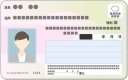
My Number Card
- Must be valid and not expired.
- Must include your current address.

Passport
 Only Airport / Office pickup
- Must be valid and not expired.
Receive (e)SIM
Delivery / Pick up / Receive by email
Depending on your documentation, your available receiving method will change.
Settings & Start
Just turn it on and connect with the password
Find the network name (SSID) and password (WPA KEY) on the back of the Pocket WiFi. Select the SSID on your device and enter the password to connect.
Explore more


For Travelers SIM / eSIM / WiFi
For Residents Monthly Plans / Home Internet
- For monthly contracts→
- Login