Staying connected in Japan is non-negotiable. Whether you are navigating Shinjuku Station on Google Maps, scanning a Shinkansen digital ticket, or translating a restaurant menu, reliable data connection shapes the entire trip.
Public WiFi exists but is fragmented, requires login portals, and drops the moment you leave a hotspot zone. A dedicated Pocket WiFi device solves all of this from the moment you land.
Quick Picks: Best Pocket WiFi by Travel Type
| Traveler Type | Best Pick | Key Reason |
|---|---|---|
| First-time visitors | Sakura Mobile / NINJA WiFi | English support, stable connection, easy airport pickup |
| Families & groups | Sakura Mobile / NINJA WiFi / Japan Wireless | Up to 15-16 devices, long battery, physical SIM |
| Business travelers | Sakura Mobile / SoftBank Global Rental | Reliable connection, 7-day English support |
| Budget Travelers | WiFiBOX / CDJapan Rental | Lowest daily rates, no setup fees |
| Extended stay (30-90 days) | Sakura Mobile / PuPuRu WiFi | Competitive long-term pricing |
| Last minute / no reservation | WiFiBOX / SoftBank Global Rental | Walk-up kiosks and airport counters, no booking required |
- Quick Picks: Best Pocket WiFi by Travel Type
- What is Pocket WiFi?
- Pocket WiFi vs SIM Card vs eSIM
- Do You Need to Reserve Pocket WiFi in Advance?
- How to Choose the Best Japan Pocket WiFi: 6 Key Factors
- Comparison: 8 Best Pocket WiFi Providers for Japan 2026
- Top Providers Reviewed
- Where to Pick Up Your Pocket WiFi in Japan
- Setup, Battery Tips, and Troubleshooting
- Frequently Asked Questions
- Which Pocket WiFi is Right for You?
What is Pocket WiFi?
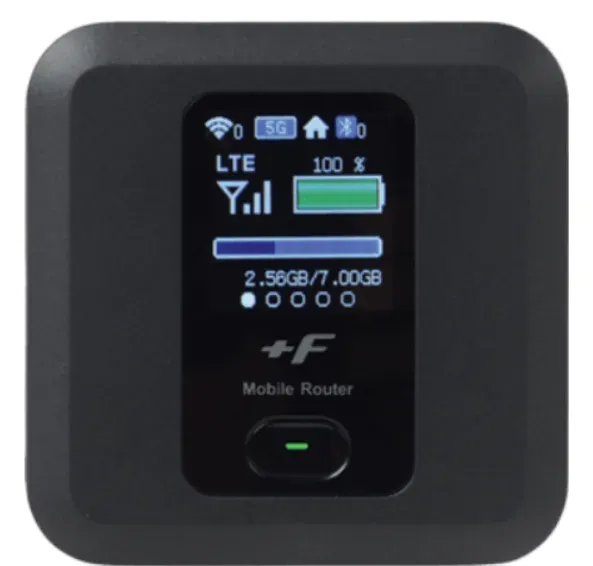
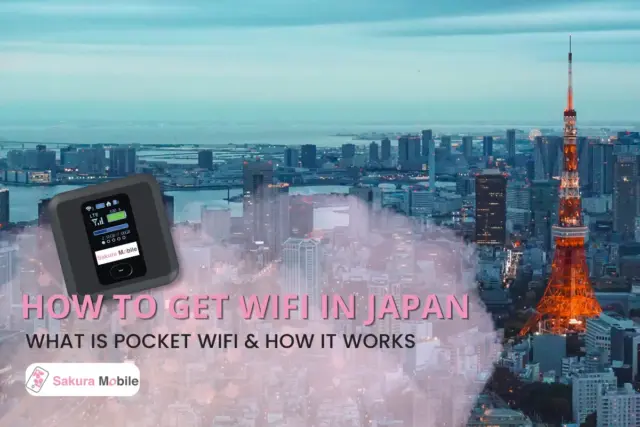
A Pocket WiFi is a small, battery-powered router that connects to Japan's cellular network, and broadcasts a private WiFi hotspot for your devices. Turn it on, enter the password, and connect—no SIM swapping, no APN configuration, and no setup required.
Best For: Families, groups, travelers with multiple devices, and anyone whose phone is locked to a home carrier.
Key Trade-Off: You carry an extra device that needs daily charging. Most units last 8-10 hours per charge. A small power bank covers the gap on long sightseeing days.
Pocket WiFi vs SIM Card vs eSIM
| Feature | Pocket WiFi | Physical SIM Card | eSIM |
|---|---|---|---|
| Works with locked phones | ✓ Yes | ✘ No | ✘ No |
| Multiple devices | ✓ Up to 15 | ✘ One only | ✘ One only |
| Setup | Power on and connect | Insert SIM, configure settings | Scan QR code, configure settings |
| Keep home SIM active | ✓ Yes | ✘ No (unless eSIM) | ✓ Yes |
| Extra device to carry | ✘ Yes | ✓ No | ✓ No |
| Best for | Groups, families, laptops | Solo, one phone | Solo, modern unlocked phone |
Bottom line: Pocket WiFi is the right choice for groups, multi-device travelers, and anyone with a locked phone. Solo travelers with a single modern unlocked smartphone may find an eSIM more convenient.
Do You Need to Reserve Pocket WiFi in Advance?
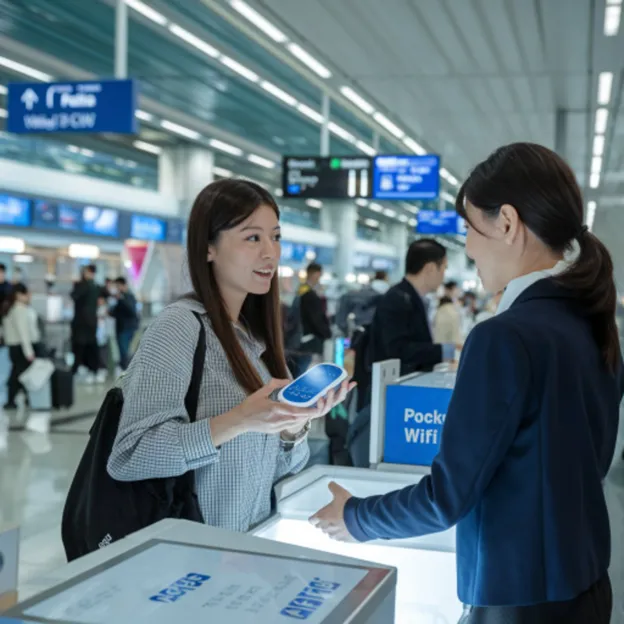
Yes—and it will save you 15-30% compared to walk-in airport pricing.
Reserving online guarantees your device is pre-packed and waiting, turns a potential 30-minute counter queue into a 60-second pickup, and ensures availability during peak seasons when walk-in stock sells out. Sakura Mobile devices take 1-3 days to reach the airport counter—book at least one week before departure.
Walk-in rentals are available at some counters (NINJA WiFi, WiFiBOX, SoftBank Global Rental), but come with higher daily rates, limited stock, and potential queues during busy arrival waves.
How to Choose the Best Japan Pocket WiFi: 6 Key Factors
Data Plan & The "Unlimited" Reality
Almost all "unlimited" plans in Japan operate under a Fair Usage Policy (FUP). Once you exceed a daily data threshold—typically 3-10 GB depending on the plan—the carrier network temporarily reduces your speed until the next reset. This is enough for basic messaging and maps, but not for streaming or video calls. Look for plans with high daily limits (like Sakura Mobile's 10 GB/day).
How much do you need?
Solo travelers typically use 1-3 GB/day for maps, translation, and messaging. Families sharing one device commonly use 5-10 GB/day.
Network Coverage
All providers use one of Japan's major carrier networks:
- docomo offers the broadest nationwide coverage, including mountain regions, rural areas, and deep subway tunnels.
- SoftBank delivers excellent speeds in major cities, but can weaken in remote areas.
- WiMAX+5G (via au) is the primary 5G option for Pocket WiFi and performs well in urban environments.
Pricing (Look Beyond the Daily Rate)
Some low-cost options add mandatory setup fees or expensive insurance options at checkout. Compare the total cost—including tax, any upfront fees, and optional insurance before assuming a budget option is actually cheaper.
English Customer Support
Look for providers with phone and email support available 7 days a week. Weekend and holiday breakdowns happen—you want a team you can actually reach.
Device Specs (Battery & Simultaneous Connections)
Standard devices last 8-10 hours. Premium models can last up to 20 hours and support up to 15-16 simultaneous connections. For groups or long days out, battery life and device capacity matter significantly.
Reviews
Prioritize reviews that mention real-world performance: subway signal reliability, battery life over a full sightseeing day, and staff responsiveness during pickup or return.
What our clients have to say
Comparison: 8 Best Pocket WiFi Providers for Japan 2026
| Provider | Network | Data Plan | 10-Day Price | Airport Pickup | Devices | Battery | Insurance | Upfront Setup Fee |
| Sakura Mobile | docomo | Unlimited (10 GB/day high-speed) | 9,878 JPY | ✓ NRT, HND, KIX, FUK, NGO, CTS | Up to 15 devices | Up to 20 hrs | ✓ 110 JPY/day | Free |
| NINJA WiFi | SoftBank | 1 GB/day or unlimited | 20,000 JPY | ✓ Major airports | Up to 16 devices | Up to 8 hrs | ✓ 440 JPY/day | Free |
| Japan Wireless | SoftBank | Truly unlimited | 11,033 JPY | ✓ Major airports | Up to 15 devices | Up to 10 hrs | ✓ 220 JPY/day | Free |
| WiFiBOX | SoftBank | 200 MB-unlimited | 3,003-13,904 JPY | ✓ Major airports | Up to 5 devices | Up to 12 hrs | ✓ 330 JPY/day | Free |
| PuPuRu | SoftBank | Unlimited | 9,000 JPY | ✘ Hotel delivery only | Up to 10 devices | Up to 8 hrs | ✓ 300 JPY/day | Free |
| CDJapan | SoftBank / WiMAX | 100 GB/month or unlimited | 6,050 JPY | ✓ | Up to 16 devices | Up to 8 hrs | ✓ 100 JPY/day | Free |
| SoftBank Global Rental (GSM Rentafone) | SoftBank | Unlimited | 8,600 JPY | ✓ NRT, HND, KIX | Up to 10 devices | ~9 hrs | ✓ 220 JPY/day | Free |
| GTN WiFi | SoftBank | 10 GB/day (300 GB/month) | 18,690 JPY (includes deposit) | ✘ Mail delivery only | Up to 10 devices | ~8 hrs | — | 3,000 JPY |
*All prices include tax and are verified as of May 2026. Confirm current rates before booking.
Top Providers Reviewed
Sakura Mobile
Best For: First-time visitors, Families & Groups, Extended Stays Up To 90 days
Sakura Mobile runs on docomo—Japan's most extensive network—with physical SIM connectivity for consistent, stable speed even in subway tunnels and rural areas. The device supports up to 15 simultaneous connections with a 20-hour battery, making it the highest-capacity device on this list for group travel. English-speaking support is available 7 days a week by phone, email, and in person in Shinjuku, or at Kansai and Fukuoka airport counters.
Device Specs: 74 x 74 x 17 mm ・ Up to 15 devices ・ 20-hour battery ・ Insurance: 110 JPY/day
NINJA WiFi
Best For: First-Time Visitors, Last-Minute Airport Pickup
A major operator with counters at all key Japanese airports, making it one of the few reliable walk-up options. Flexible tiered plans from 1 GB/day to truly unlimited, with a 5G add-on available. Pricing is higher than most, but significant promotional discounts are frequently available.
Japan Wireless
Best For: Families & Groups, Heavy Data Users
The best choice if you need genuinely unlimited data with no daily speed cap. Includes a free portable power bank—the only provider on this list to do so. This means you can take long video calls or stream HD videos with network throttling.
WiFiBOX
Best For: Last-Minute Bookings, Budget Travelers
Self-service kiosks at airports and train stations let you pick up and return a device without visiting a staffed counter. The device doubles as a portable power bank with built-in charging cables. Maximum five simultaneous connections makes it the best for solo travelers or couples.
PuPuRu WiFi
Best For: Extended Stays of 30-90 Days
Clear flat-rate pricing on SoftBank with zero hidden fees. Hotel delivery only—no airport pickup. Best for travelers who know their accommodation address at the time of booking.
CDJapan Rental
Best For: Budget Travelers
The lowest 10-day rate on this list at 6,050 JPY. WiMAX+5G plan available for urban 5G speeds. No setup fees and prepaid return envelopes included. This makes it a functional, low-cost choice for budget travelers prioritizing base price over extensive support features.
SoftBank Global Rental
Best For: Business Travelers, Last-Minute Trips
Operated independently by GSM Rentafone, this service maintains physical collection counters across Narita, Haneda, and Kansai airports. They feature unlimited data packages running on the SoftBank network. It is a reliable traditional walk-up choice for travelers landing during main airport hours.
GTN WiFi
Best For: Multi-Language Groups
GTN offers support in 13 languages, including Japanese, English, Chinese, Korean, and more. Their standard 10-day price sits at 18,690 JPY due to a mandatory 3,300 JPY upfront setup fee and a refundable 10,000 JPY security deposit.
Where to Pick Up Your Pocket WiFi in Japan
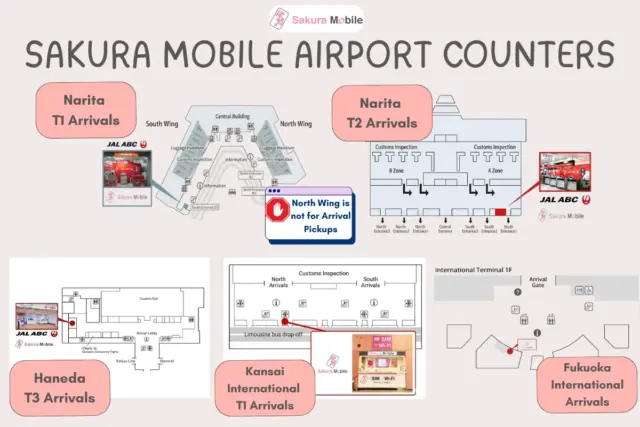
Sakura Mobile has counters at six Japanese airports. Reserve online—devices take 1-3 days to prepare, so booking at least one week in advance is recommended.
| Airport | Counter Location | Hours |
|---|---|---|
| Narita (NRT) T1 | South Wing, 1F, Arrival Lobby, JAL ABC Counter | 6:30 AM – 1 hr after the last international flight |
| Narita (NRT) T2 | 1F Arrival Lobby, JAL ABC Counter | 6:30 AM – 1 hr after the last international flight |
| Haneda (HND) T3 | 2F Arrival Lobby, JAL ABC Counter | 4:00 AM – 1:00 AM (closed 1 AM–4AM) |
| Kansai (KIX) | 1F Arrival Lobby, Sakura Mobile Counter | 6:00 AM – 11:00 PM |
| Fukuoka (FUK) | 1F Arrival Lobby, Sakura Mobile Counter | 7:00 AM – 9:00 PM |
| Chubu Centrair (NGO) | Welcome Garden 1F, Airport Post Office | Weekdays 9:00 AM – 5:00 PM only |
| New Chitose (CTS) | Domestic Terminal Post Office, Center Plaza 2F | 9:00 AM – 5:00 PM |
Hotel Delivery: If your flight lands after counter hours, select hotel delivery at checkout. Your device arrives before or shortly after check-in. Book at least 3-5 days in advance.
Return: Place the device in the prepaid envelope included in your kit and drop it in any red Japan Post mailbox—including those inside airport departure terminals before security.
Setup, Battery Tips, and Troubleshooting
Setup (under 2 minutes):
- Press and hold the power button for 3-5 seconds until the screen lights up
- Open WiFi settings on your device and select the SSID printed on the router sticker
- Enter the password printed on the sticker and connect
- Confirm with a quick map or browser test
Battery Tips: Charge fully overnight every night. Turn the device off in long underground sections (subway tunnels, basement food halls) where signal drops—the router drains battery searching for a connection. Carry a small power bank for full-day plans.
If you have no internet despite being connected: Turn the device completely off, wait 10 seconds, and turn it back on. This forces the hardware to reconnect to a new cell tower and resolves the issue in most cases.
If speeds drop suddenly: You may have exceeded your plan's high-speed threshold. Basic maps and messaging will still work. Full speeds return at the next reset period.
Frequently Asked Questions
- Q: What does "unlimited" data actually mean in Japan?
A: Almost all "unlimited" Pocket WiFi plans operate under a Fair Usage Policy (FUP). Once you exceed a daily high-speed threshold (typically 3-10 GB), the carrier network may slow your speeds to around 200 Kbps—sufficient for maps and messaging but not streaming. Speeds reset.
- Q: Is WiFi insurance necessary?
A: Yes. A dropped or lost device can result in a replacement penalty of 20,000 JPY–40,000 JPY. Sakura Mobile's insurance option costs 110 JPY/day—for a 10-day rental, that's 1,100 for 90% coverage. It's worth it.
- Q: Is there free public WiFi in Japan?
A: Limited. Free WiFi exists at major stations, convenience stores, and coffee chains, but requires registration, auto-disconnects every 15-30 minutes, and is unencrypted. This makes it unsafe for passwords, banking, or remote work.
- Q: Can I pick up at one airport and return the device at another?
A: Yes. Drop the device in any Japan Post mailbox using the prepaid return envelope. You are not required to return to your original airport.
- Q: What payment methods are accepted?
A: Sakura Mobile accepts a wide range of international credit and debit cards, including VISA, MasterCard, JCB, AMEX, Discover, and Diners Club. You may also complete your purchase via PayPal.
FAQ
Which Pocket WiFi is Right for You?
| Travel Profile | Recommended Provider | Key Reason |
|---|---|---|
| First-time visitors & families | Sakura Mobile or NINJA WiFi | English support, airport pickup, large device capacity |
| Business travelers or remote works | Japan Wireless or Sakura Mobile | Truly unlimited or rock-solid docomo coverage with high daily caps |
| Budget travelers | CDJapan or WiFiBOX | Lowest daily rates, no setup fees |
| Extended stays (30-90 days) | Sakura Mobile or PuPuRu WiFi | Competitive long-term pricing |
| Last minute / walk-up | WiFiBOX or SoftBank Global Rental | No reservation needed |
| Multi-language groups | GTN WiFi | Support in 13 languages |
No single provider suits every trip. For most first-time visitors, families & groups, and extended stays, Sakura Mobile's combination of docomo coverage, 20-hour battery, 15-device capacity, and 7-day English support makes it a reliable all-around choice.
Whichever provider you choose, securing your connection before you land is the easiest way to ensure a completely stress-free arrival.