
TL;DR: Telstra roaming in Japan costs 10 AUD per day and includes 2 GB of data per day. On a 14-day trip, that can add up to 140 AUD. Telstra's 14-day Pre-Paid pack is cheaper at 25 AUD, but only includes 4 GB of data. Sakura Mobile's eSIM plans cost ~60.60-80.79 AUD for 14 days, offer more data, and let you keep your Telstra number active for calls and texts.
Is Your Telstra Plan Covered for Japan Travel?
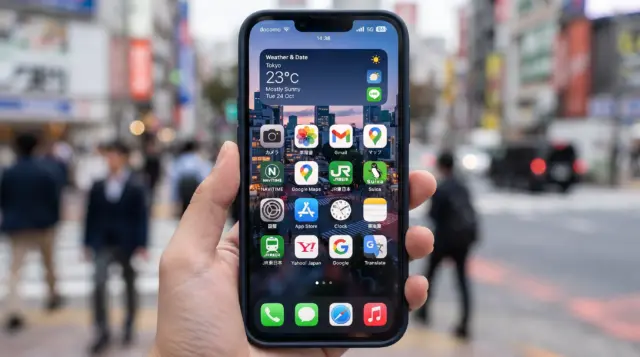
Yes. Japan falls under Telstra's Zone 2 International coverage. This zone covers 80+ countries. You can connect in three ways:
- Postpaid Upfront plans → International Roaming Day Pass (10 AUD/day used)
- Pre-Paid plans → fixed roaming packs bought after landing (3, 7, or 14 days)
- No pass or pack activated → default pay-as-you-go rates, which are extremely expensive
Your account type decides which option applies to you. Check this in the My Telstra app before you fly. Older (non-Upfront) postpaid accounts follow different reset rules than current Upfront plans.
What a Telstra Day Pass Actually Costs in Japan
Telstra's International Roaming Day Pass costs 10 AUD for each day you use your service in Japan. It includes 2 GB of data, plus unlimited standard calls and texts. You're only charged on days you actually use your phone. Leave it in airplane mode for a day, and you pay nothing that day.
Pre-Paid customers buy a fixed pack instead, after they land. If you land without a Day Pass turned on or a Pre-Paid pack bought, Telstra charges its default rate: 3 AUD per MB. At that rate 1 GB of data would cost about 3,000 AUD. Don't let this happen—its essentially a penalty rate deisgned to discourage accidental usage.
| Option | Price | Data | Calls & SMS | Best for |
|---|---|---|---|---|
| Day Pass (Upfront & postpaid) | 10 AUD/day | 2 GB/day | Unlimited (Standard calls & SMS) | Trips where daily usage varies |
| Data Top-Up (Day Pass add-on) | 10 AUD | +2 GB | – | Days you blow through the daily 2 GB |
| Pre-Paid 3 Day Pack | 10 AUD flat | 400 MB | 15 SMS/MMS, 15 min calls | Very short, light-data trips |
| Pre-Paid 7 Day Pack | 15 AUD flat | 2 GB | 25 SMS/MMS 25 min calls | Short trips, light map or message use |
| Pre-Paid 14 Day Pack | 25 AUD flat | 4 GB | 50 SMS/MMS 50 min calls | Light users on longer trips |
| Pay-As-You-Go (no pass/pack) | Per use | 3.00 AUD/MB | 75 cents/SMS 3.00 AUD/min | Nobody—avoid this |
The Pre-Paid 14-day pack looks like the cheapest choice in this table. But 4 GB over two weeks works out to less than 300 MB a day. That's fine if you only check a map now and then. It runs out fast if you're using navigation, translation, and photos every day—which is most travelers in Japan.
When Does Your Telstra Data Reset in Japan?
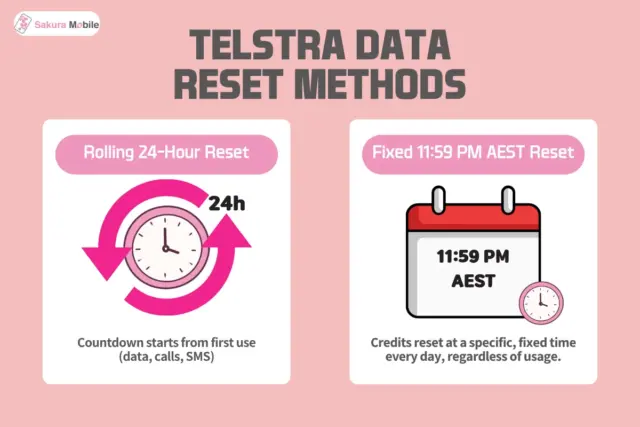
This is the part that most skip over. It can quietly cost you data mid-trip.
Telstra uses two different reset rules, depending on your plan type:
- Upfront plans (current postpaid): Your Day Pass runs on a rolling 24-hour clock. It starts the moment you first use data, make a call, or send a text overseas. Land at 9 AM and start using at 10 AM? Your pass resets at 10 AM the next day—no matter what time it is in Australia.
- Older, non-Upfront postpaid plans: Your Day Pass ends at a fixed time: 11:59 PM Australian Eastern Standard Time (AEST). It doesn’t matter when you started using it that day. Japan is one to two hours ahead of AEST, depending on the time of year. So this rule can cut off your data in the middle of your afternoon or evening in Japan—while you’re still out.
How to check which rule applies to you: Open the My Telstra app before you fly and check your plan type. Not sure? Assume the strict fixed-AEST rule until you've confirmed otherwise, so you're not caught off guard on day one.
Network Coverage and Speed: What to Expect

Telstra roaming in Japan connects through local partner networks, not a direct Telstra connection. Telstra does not promise you'll get good connectivity, speed, or coverage while roaming. How well it works depends on your device and whether it supports the partner network and something called VoLTE roaming. Check your phone's roaming and VoLTE settings before you fly since these partner deals can change.
What Happens on the Shinkansen and in Rural Areas
Roaming connections are usually slower to reconnect after tunnels than a local Japanese eSIM. That's because your phone has to reconnect to a roaming partner network, instead of staying on one steady carrier. Expect short signal gaps after long tunnels between cities like Tokyo, Kyoto, and Osaka.

Want a guaranteed 5G connection?
A local eSIM connects straight to a Japanese carrier's network instead of using a roaming partner. Sakura Mobile's plans run on NTT docomo's (3GB/day plan) and au (KDDI)'s (Unlimited plan) 5G networks.
Turning on Telstra Roaming Before You Fly
- Open the My Telstra app and go to Services → Extras → International Roaming. Turn the Day Pass on. Do this before you fly—it can take up to two hours to activate.
- Pre-Paid customers: wait until you land in Japan, then buy a pack in the app, at recharge.telstra.com.au, or by calling +61 439 125 109. Packs start working the moment you buy them, so there’s no reason to buy early.
- Check that your phone’s Data Roaming setting is turned on.
- If international roaming was ever manually turned off on a Pre-Paid device, turn it back on before you buy a pack.
Need help overseas? Use 24/7 chat in the My Telstra app, or call free from a Telstra service (phone support runs Monday-Friday, 8 AM-7 PM AEST).
14 Days in Japan: The Real Cost Comparison
Here's what a 14-day trip really costs across each option, data included:
| Option | 14-day total (AUD) | Data limit | Network |
|---|---|---|---|
| Telstra Pre-Paid 14-Day Pack | 25 AUD | 4 GB total (~285 MB/day average) | Partner roaming, not guaranteed |
| Sakura Mobile 3 GB/day | ~60.60 AUD (6,930 yen) | 3 GB/day fast data (then slows to 200 Kbps until midnight) | Direct to docomo 5G |
| Sakura Mobile Unlimited | ~80.79 AUD (9,240 yen) | No cap No slowdown | Direct to au (KDDI) 5G |
| Telstra Day Pass (used daily) | 140 AUD | 2 GB/day | Partner roaming, not guaranteed |
Sakura Mobile prices are listed in JPY and converted to AUD on August 31, 2026. Check current pricing before you book, since the exchange rates shift.
The pattern is clear: once you use it daily, Telstra's Day Pass is the most expensive and limited option here. The Pre-Paid pack really is the cheapest—but only works if you use very little data. Most travelers spending full days out exploring do better in the middle: a Japan eSIM gives you more data than the Pre-Paid pack, costs far less than the Day Pass, and doesn't force you to track reset times.
Considering a Local Japan eSIM for Japan?
If Telstra's roaming costs or data limits don't fit your trip, a Japan eSIM is another option. Unlike international roaming, an eSIM connects directly to a local network in Japan and is usually sold as a fixed-price plan for your entire trip. Sakura Mobile offers both a 3 GB/day plan and an Unlimited plan, giving travelers a choice based on their data needs.
Before choosing an eSIM, keep these points in mind:
- Not all “unlimited” plans are truly unlimited. Some plans advertised as unlimited reduce speeds after you use a certain amount of high-speed data each day. Always check the provider’s Fair Usage Policy (FUP) before you buy.
- Traveling with family or friends? Consider a Pocket WiFi. A Pocket WiFi router lets multiple devices share one connection and may work out cheaper for groups. However, you'll need to carry and charge an extra device throughout your trip.
- Your phone must support eSIM. Most iPhones from the iPhone XS onward and many newer Android devices support eSIM. Your phone must also be carrier-unlocked to use a Japan eSIM.
- Physical SIM cards are still available. If your phone doesn’t support eSIM, a physical SIM card can provide similar coverage and data options.
For many travelers, a Japan eSIM offers a balance between convenience, cost, and data allowance, especially on trips longer than a few days.
Need help while you're in Japan? Sakura Mobile provides support during Japan business hours by phone, email, and chat. Travelers can also get in-person assistance at Kansai and Fukuoka airports and the Sakura Mobile office in Shinjuku.
Compare Sakura Mobile's 3GB/day and Unlimited Japan eSIM plans and check current pricing.
Dual SIM in Japan: Keep Your Telstra Number Live
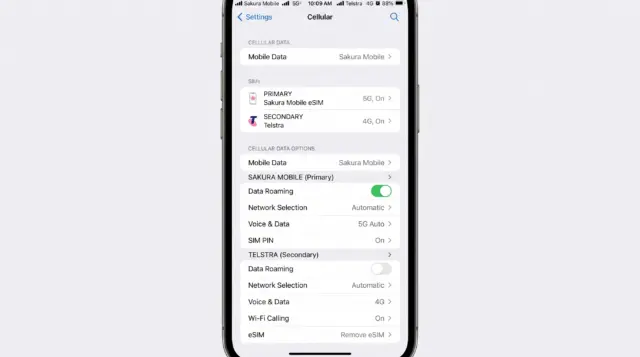
You don't have to pick just one. Most travelers keep their Telstra SIM in the phone for calls, texts, and two-factor login codes, while switching their data over to a local eSIM.
How to set it up:
- Turn off Data Roaming for your Telstra line in your phone's settings. Calls and texts don't need data, so this alone won't cut you off.
- Turn off "Allow Cellular Data Switching" in your phone's settings. Without this, your phone can quietly switch back to the Telstra line for data—and trigger a 10 AUD Day Pass charge without you noticing.
- Install and activate your eSIM after you land in Japan. Connect to the airport’s free WiFi and complete the setup before leaving the airport. This helps avoid activation issues and prevents accidental data usage before you need it.
- Switch your mobile data to the eSIM once setup is complete. Keep your Telstra SIM active for calls, texts, and two-factor authentication codes.
This setup is why most travelers keep an Australian SIM active while using a Japan eSIM for data. That way, they can still receive calls, texts, and bank verification codes without paying for roaming data.
Troubleshooting: Common Issues and Fixes
My eSIM won't turn on before I land. For Sakura Mobile eSIMs, we recommend installing and activating your eSIM after you arrive in Japan using airport WiFi. Some plans may start as soon as they are activated, so waiting until you land helps ensure you get the full value from your plan and avoid setup issues before your trip.
I installed the eSIM but have no signal. Check that Airplane Mode is turned off and that your eSIM is enabled. Your phone may need a few minutes to connect to a local network after arrival. If the issue continues, restart your device and confirm that the eSIM is selected for mobile data.
My Telstra Day Pass charged me on a day I didn't mean to use it. This usually happens when Allow Cellular Data Switching is turned on and your phone uses data from your Telstra line in the background. If you're using a Japan eSIM for data, turn this setting off before you travel to help avoid unexpected roaming charges.
My data is much slower than I expected. Check whether you've reached your plan's high-speed data limit. Telstra's International Roaming Day Pass includes 2 GB of high-speed data per day before speeds are reduced. Many Japan eSIM plans also slow down after you reach their daily high-speed data limit. If your connection is slow but still working, you've likely reached your limit rather than having a network issue.
Which Option Actually Fits Your Trip?
| Traveler type | Trip length | Data habits | Best fit |
|---|---|---|---|
| Light user | 3-5 days | Check maps sometimes, few messages | Telstra Pre-Paid pack |
| Standard Traveler | 7-14 days | Maps, translation, photos every day | Sakura Mobile 3GB/day |
| Heavy user/ remote work | 7+ days | Streaming, hotspot, video calls, uploads | Sakura Mobile Unlimited |
| Group or family trip | Any length | Wants to share one connection | Pocket WiFi rental |
| Wants simplicity over savings | Any length | No setup, doesn't mind the price | Telstra Day Pass |
If you mostly check maps and send the occasional message on a short trip, Telstra's Pre-Paid pack works well. It's a flat cost, with no reset rules to track, and you're done thinking about it once you buy it. If you're out all day, every day, relying on translation apps and navigation, the daily cap becomes the real problem—not the price.
FAQ
- Q1: Does Telstra roaming work in Japan?
Yes. Telstra roaming works in Japan under Zone 2 International coverage. You can use an International Roaming Day Pass (postpaid Upfront), a Pre-Paid pack, or fall back to pay-as-you-go rates if you don't set either one up in advance—though pay-as-you-go rates are very costly.
- Q2: How much does Telstra's Day Pass cost in Japan?
10 AUD for each day you use your service. It includes 2 GB of data and unlimited standard calls and texts. Use it every day of a 14-day trip, and the total is 140 AUD.
- Q3: When does Telstra's daily data reset in Japan?
On Upfront plans, it resets 24 hours after you first use data, a call, or a text—a rolling clock. On older, non-Upfront postpaid plans, it resets at a fixed 11:59 PM Australian Eastern Standard Time instead. This can cut you off in the middle of your afternoon or evening in Japan.
- Q4: What happens if I use Telstra data in Japan without a Day Pass or Pre-Paid pack?
You're charged the default pay-as-you-go-rate of 3 AUD per MB. At that rate, 1 GB would cost about 3,000 AUD. Always turn on a Day Pass or buy a pack instead.
- Q5: Can I use Telstra and a Japan eSIM at the same time?
Yes. Keep your Telstra SIM active, with Data Roaming turned off, for calls, texts, and bank codes. Run your data through a local eSIM instead.
- Q6: Is an "unlimited" Japan eSIM plan really unlimited?
Not always—check the fine print. Some plans marketed as unlimited cap fast data around 3 GB or less a day, then slow after that. Sakura Mobile's Unlimited plan (au network) has no daily cap and no slowdown. The 3GB/day plan (docomo network) slows to about 200 Kbps after the daily cap, until the next reset.
FAQ
One Last Thing Before You Fly to Japan

Between a 10 AUD-a-day Day Pass, a 4 GB cap on the Pre-Paid pack, and two different reset rules depending on your account type, Telstra roaming asks you to keep track of a lot.
For short, light-data trips, the Pre-Paid pack is a fair, easy choice. For anyone spending full days out—using navigation, translation, and taking photos—a local eSIM plan gives you more data at a lower cost than the Day Pass, with no reset clock to watch. And your Telstra number stays live for calls and bank codes the whole time.