Landing at Kansai International Airport (KIX) is the start of your trip through Osaka, Kyoto, Nara, and beyond. But before you head out, you'll need a way to stay connected.
Japan's free public WiFi is limited outside major tourist areas, and while KIX offers WiFi in its terminals, that access ends the moment you leave the building.
Getting SIM card at Kansai Airport solves this in minutes. This guide shows you exactly where to pick one up in Terminal 1 and Terminal 2, and walks through what to check before you buy.
Quick Answer
Sakura Mobile is a convenient choice for a physical SIM card at Kansai Airport (KIX). You can get one at a staffed counter in Terminal 1's International Arrival Lobby, open daily from 6 AM to 11 PM. Plans start at 3,850 yen for 3 GB/day on the docomo network. An unlimited data plan is also available on au 5G. You do not need to return the SIM card, and the English-speaking staff are available to help.
Alternatives: NINJA WiFi and Telecom Square also offer SIM options at Kansai Airport. Services are available in Terminal 1 and 2.
- Quick Answer
- Comparing the Top 3 SIM Card Providers at Kansai Airport
- Which Option is Best For You?
- Where and How to Get Your SIM Card
- Top 3 SIM Cards at Kansai Airport
- 3 Things to Look for When Choosing a SIM Card
- Compatibility Checklist Before You Buy
- Lost or Damaged SIM Cards
- Physical SIM Card vs. eSIM: Which Should You Choose?
- Frequently Asked Questions
- Get Connected at Kansai Airport
Comparing the Top 3 SIM Card Providers at Kansai Airport
Here is a side-by-side look at the three main SIM card options at Kansai Airport. This table shows each provider's price, data plan, and pickup location, so you can pick the right one fast.
| Sakura Mobile | Ninja WiFi (Shogun SIM) | Telecom Square | |
| Pickup Location | Terminal 1, 1F North (International Arrival Lobby) | Terminal 1, 1F (North & South counters) 3F (vending machines) Terminal 2 (Vending machines) | Terminal 1, 1F, Vending Machines |
| Operating hours | 06:00-23:00 daily | 06:00-23:00 (1F) | Counter: 09:00-19:00 (Counter pick-up not available) |
| Online Reservation | ✅Yes | ✅Yes | ✅Yes |
| English Support | 7 days a week via chat, email, and phone; In-Person available at the Kansai Airport Counter | 24/7 | Available |
| Network | docomo 5G / au 5G | docomo 4G / SoftBank 5G | docomo 4G |
| Coverage | 99% of Japan | 99% of Japan | 99% of Japan |
| Data Plan | Unlimited or 3GB/day | Unlimited (fair use policy applies) | Unlimited (fair use policy applies) |
| Typical Validity | 1-90 days | 15-60 days | 8-31 days |
| Prices | Unlimited: From 4,150 yen (≈$26 USD) 3GB/day: From 3,850 yen (≈24 USD) | From 4,857 yen for 10 GB for 15 days | From 6,000 yen for 8 days |
*Prices include tax. Insurance and add-ons are priced separately.
Sakura Mobile prices are listed in Japanese yen and converted to USD on September 1, 2026.
Which Option is Best For You?
The table above tells you what each plan offers. Here's how to match that to your trip.
- Solo travelers & light users → Sakura Mobile's 3GB/Day data plan (from 3,850 yen) covers what most solo trips need—maps, messaging, and some social media—without paying for data you won't use.
- Families & groups → Sakura Mobile's Unlimited plan on the au network is a good fit for families and groups who expect to use a lot of data during their trip. Whether you're streaming, video calling home, sharing photos, or navigating around Japan, there's no high-speed data cap to track each day.
- Business travelers → Sakura Mobile's Unlimited plan works well here too, since it supports VPN access such as PPTP, OpenVPN, and L2TP/IPsec. That means steady coverage for video calls and the ability to log into work systems securely while you travel.
- Travelers who value convenience → NINJA WiFi is one of the easiest options to pick up on arrival. You can grab a device from a counter or vending machine in either terminal without arranging delivery in advance.
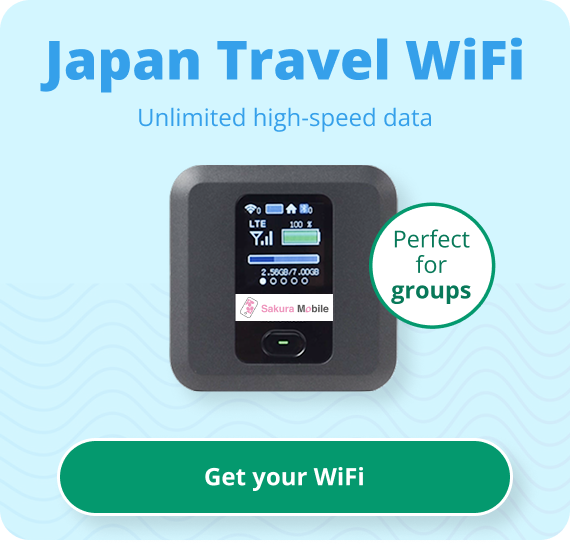
- Not sure if your phone will work? → Skip the SIM card and get a Pocket WiFi device instead. It sidesteps unlock issues, SIM size, and frequency-band problems completely.
Where and How to Get Your SIM Card
Sakura Mobile Counter: Terminal 1 Pickup
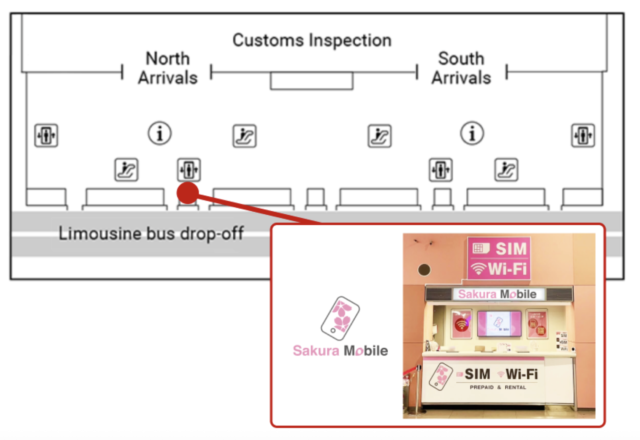
Sakura Mobile has a staffed counter at Kansai Airport, on the first floor of the International Arrival Lobby in Terminal 1.
After you clear customs and walk into the arrival lobby, look for the Sakura Mobile counter along the main corridor. It's near other travel services, like currency exchange and baggage delivery, so it's easy to find.
Counter details:
 Location:Terminal 1, 1st Floor, International Arrival Lobby
 Operating Hours:6:00 AM-11:00 PM, every day
 Staff:English-speaking staff on-site
Long hours mean you can get your SIM card even on an early or late flight, so you have internet the moment you leave the airport.
Terminal 2 Passengers: What to Do
Sakura Mobile does not have a counter in Terminal 2. If you land there, take the free shuttle bus to Terminal 1 to pick up your SIM card. The shuttle runs between Terminal 1's Aeroplaza building and Terminal 2, and the ride is short.
How to Reserve Online Before You Fly
You can order your SIM card online ahead of time through the Sakura Mobile website. Same-day counter purchases are available too, but ordering at least three days before your pickup date gets you free shipping and a guaranteed SIM card. If you're short on time, express shipping is also an option.
When you order online, choose "Kansai International Airport" as your pickup location and choose your arrival date. You'll receive a confirmation email with your order details and pickup instructions.
Picking Up Your Order at the Counter
When you arrive at the Sakura Mobile counter:
- Show your passport for ID check.
- Give your order confirmation number (from your email).
- Get your SIM card and setup instructions.
The whole process takes just a few minutes, and the English-speaking staff can help you with any questions.
Do You Need to Return the SIM Card?
No. You don't have to return your Sakura Mobile SIM card after your trip. Just throw it away when you're done. There's no return counter to visit and no extra steps, which makes the whole process simple.
Hotel/Residence Delivery Options
If you'd rather not pick up at the airport, you have other options:
- Hotel delivery: Free delivery to any hotel in Japan.
- Residence delivery: If you're staying with a friend, you can have it sent to their place.
For complete details about all pickup locations and hours, visit the Sakura Mobile Pickup & Return page.
Top 3 SIM Cards at Kansai Airport
👑#1. Sakura Mobile
Sakura Mobile has served thousands of visitors to Japan and built a strong reputation for reliable service and good customer support. What sets it apart is dependable coverage on Japan's leading networks, combined with flexible Unlimited and 3GB/day data plans, easy online ordering, and English support throughout your trip. Whether you're staying a week or three months, Sakura Mobile has a plan that fits.

Key Features:
- 3GB/Day data plan starting at 3,850 yen (tax included)
- Runs on the docomo and au 5G networks
- Covers 99% of Japan's populated areas
- English support available every day
- Order online and pick up as soon as the next day with express shipping.
- Pickup counters at all major international airports
🥈 NINJA WiFi (Shogun SIM)
NINJA WiFi is a convenient, affordable option at Kansai Airport. With 24/7 vending machine access and counter service, it's a quick and easy way to get a SIM card. It's known for being widely available at a competitive price, which makes it a good fit for travelers who need reliable data without extra hassle.
Key Features:
- Unlimited data (fair use policy applies)
- Pickup options on both Terminal 1 and Terminal 2
- Flexible rental lengths
- Same-day pickup available
🥉 Telecom Square
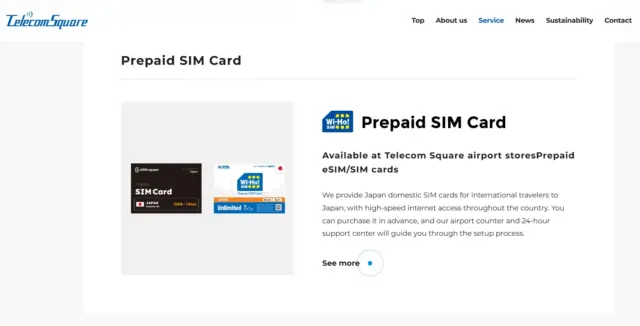
Telecom Square is a another prepaid SIM card option at Kansai Airport. It offers data-only SIM cards for tourists, with plans available on the docomo 4G network. Travelers can purchase a SIM card directly at the airport.
Key Features:
- Data-only SIM cards for tourists
- Fixed-data plans, plus Unlimited options
3 Things to Look for When Choosing a SIM Card
Advance Reservations are Available
Ordering online instead of at the counter usually saves you money and guarantees you'll have a SIM card waiting, especially during busy travel seasons like cherry blossom season (March-April) or fall foliage season (October-November). Airport counters have limited stock, and if they run out, you're stuck without internet.
Sakura Mobile recommends ordering at least three days before your pickup date. Just order online, choose Kansai Airport as your pickup spot, and your SIM card will be ready when you land. Walk-in orders work too—show your confirmation and passport at the counter, and you're done in minutes.
Some providers don't offer online ordering at all, which means you're gambling on availability. Others need orders placed by 4:00 PM Japan time the day before pickup.
Bottom line: reserve online before you fly. It's cheaper, more reliable, and faster.
Unlimited Data Plans
Because free WiFi is limited outside tourist areas, unlimited data means you won't have to worry about running out at the wrong moment.
How much data do you actually need?
Many travelers use around 1 GB of data per day, depending on how heavily they rely on maps, social media, and video streaming. Here's a rough breakdown:
| Travel Style | Data Needed Per Week | Example Activities |
| Light User | ~1 GB | Google Maps, messaging, light browsing |
| Medium User | 1-3 GB | Social media, some video streaming, emails |
| Heavy User | 3 GB+ | YouTube, video calls, remote work |
Why unlimited plans are worth it:
You can't plan for everything. Unexpected train changes, hunting for restaurants, translating menus, video calling home—it all adds up fast. Streaming video uses 300-700 MB per hour, and video calling apps like WhatsApp use about 3 MB per minute.
Sakura Mobile's Unlimited data plan starts at 4,510 yen for four days, so you can stay connected without watching a data meter.
Network coverage and speed:
Sakura Mobile uses both the docomo and au networks for 5G coverage, docomo covers about 99% of Japan and averages about 168 Mbps on 5G downloads, scoring high for both rural and urban coverage. The au Unlimited data plan also delivers strong truly unlimited coverage—so with Sakura Mobile, you get solid indoor and outdoor coverage across Japan, including rural spots like mountain temples, and countryside towns.
English Support
Problems can happen with any SIM card—your phone might not recognize it, the APN settings might need adjusting, or mobile data might switch off by accident. When that happens in a foreign country, English-speaking support makes a real difference.
What Sakura Mobile offers:
Full English support, seven days a week, through email, an online contract form, counter staff, and phone. Whether you run into trouble at the airport or later in your trip, help is available in English whenever you need it.
What to look for in support:
- Multiple contact methods: a contact form for urgent issues, email for detailed questions, phone for harder problems
- Extended hours: support beyond standard business hours
- Clear instructions: English-speaking staff who can walk you through fixes
Some providers only offer limited English support, or none at all. Before you buy, confirm the provider offers English support and save their contact info in your phone. You probably won't need it—but you'll be glad to have it if you do.
Compatibility Checklist Before You Buy
Before you reserve a prepaid SIM card, check a few things about your phone. If it isn't compatible, you may need an eSIM or a Pocket WiFi device instead.
Is Your Phone Unlocked?
A locked phone can't use SIM cards from other carriers—including one from Japan. If you're not sure whether your phone is unlocked, contact your carrier before you travel, you may need to unlock your phone through your carrier before your trip. If it's locked and you can't get it unlocked, a Pocket WiFi device is your best option for internet in Japan.
What SIM Size Do You Need?
If you've never swapped a SIM card before, you might not know there are three sizes: regular, micro, and nano. Sakura Mobile's SIM cards come with a free adjuster that fits any device so you don't need to worry about ordering the wrong size.
Is Your Phone Compatible with Japanese Bands?
Japan's mobile networks use specific frequency bands. Make sure your phone supports the ones used here:
docomo network (used by Sakura Mobile's 3GB/Day SIM):
- 5G: n78, n79 (main), n1, n28 (support)
- 4G LTE: Band 1 (main), Band 19 (support)
au (KDDI) network (used by Sakura Mobile's Unlimited SIM):
- 5G: n77, n78 (main), n3, n8 (support)
- 4G LTE: Band 1 (main), Band 18 (support)
This is a new topic for a lot of travelers—if you have questions, contact Sakura Mobile's customer support team, or check the Sakura Mobile device compatibility page.
If you can't confirm any of the above before your trip, a Pocket WiFi device is the safer bet. It works even if your phone is locked, the SIM doesn't fit, or your device isn't compatible.

Traveling with friends or family? Sharing a Pocket WiFi device might be the better fit for your group.
Check out our blog below for more information on Pocket WiFi rentals!
Best Pocket WiFi with Unlimited Data
Lost or Damaged SIM Cards
Here's the good news: Sakura Mobile's travel SIM cards don't need to be returned. Just throw yours away once you're done using it.
The insurance fee is typically 500 yen per SIM card and covers compatibility issues. If you insert the SIM and find out your device isn't compatible, you can request a refund or switch to a Pocket WiFi. If your SIM is lost, report it to customer service as soon as possible.
If you run into any issues during your trip, Sakura Mobile's English-speaking support team is ready to help through the online contact form, any time.
Physical SIM Card vs. eSIM: Which Should You Choose?
Sakura Mobile offers both physical SIM cards and eSIMs, so you can pick whichever fits your device and style.
| Physical SIM Card | eSIM | |
| Availability | Available at KIX from most providers | Available for selected plans |
| Activation | Manual insertion required | Activates digitally, no swap needed |
| Convenience | Requires a physical swap when switching networks | No SIM card to swap |
| When Data Starts | Immediately after insertion and setup | Immediately upon arrival in Japan (if set up in advance) |
| Device Support | Works with any phone that has a SIM slot | Must be eSIM-capable (newer smartphones) |
| Removal | Can be removed and reinserted if needed | Can only be installed once—don't remove it after setup |
| After Your Trip | Throw it away | Nothing to dispose of |
Physical SIM cards work well if you:
- Have an older phone that doesn't support eSIM
- Prefer managing something physical
- Want the flexibility to remove and reinsert the SIM if needed
eSIMs work well if you:
- Have a newer smartphone, including US iPhones that no longer take physical SIM cards
- Want to get set up before you leave home for instant connectivity on arrival
- Like a fully digital setup with no physical card to manage
Both options give you reliable data across Japan. All travel plans are data-only (no phone number), but you can still make calls and send messages through apps like WhatsApp, Messenger, Instagram, LINE, iMessage, and FaceTime.
Frequently Asked Questions

- Q1. Can I get a SIM card with a phone number?
A: In Japan, prepaid SIM cards usually don't come with a phone number, because ID verification for phone numbers is strict. That makes it hard to sell numbered SIM cards to travelers. You can still use internet-based apps like WhatsApp, Messenger, Instagram, LINE, iMessage, and FaceTime for calls and messages.
- Q2. How do I know if my phone is unlocked?
A: Your device needs to be unlocked (SIM-free) to use Sakura Mobile's SIM cards or any other local Japan providers. Phones from most European and Asian countries are unlocked, but US phones are sometimes locked by the carrier.
If you’re not sure, contact your carrier before your trip—you can’t use a SIM card if your phone isn’t fully paid off. Most carriers can unlock a phone remotely or walk you through the process.
If your phone is locked and can’t be unlocked in time, a Sakura Mobile Pocket WiFi device will still work.- Q3. Can I use tethering or a hotspot with the travel SIM card?
A: Yes. Sakura Mobile's SIM cards support tethering and hotspot features on both iPhone and Android. You can share your connection with a laptop, tablet, or a travel companion's phone.
- Q4. What does "unlimited data" actually mean?
A: It means you pay one flat rate that covers your data use for the rental period, no matter how much you use. You won't get extra charges, and your service won't get cut off based on usage.
Most unlimited plans follow a Fair Usage Policy (FUP), which keeps the network stable for everyone by slowing down speeds for users who use extreme amounts of data. For Sakura Mobile’s docomo 3GB/Day SIM, high-speed data slows after you use 3GB in a day, but your high-speed data resets at midnight the next day. The au Unlimited SIM doesn’t have this limit—it's truly unlimited with no slowdowns. For typical travel use—navigation, social media, email, and occasional video calls—either plan is more than enough.- Q5. Can I use a VPN with the travel SIM card?
A: Yes. Sakura Mobile's Travel SIM cards support VPN services, including PPTP, OpenVPN, and L2TP/IPsec. You can use a VPN to reach geographical restrited services or keep your browsing private.
- Q6. What if I need to change my pickup date or location?
A: You can update your shipping address and delivery date any time before it ships (usually five days before your pickup date). Contact Sakura Mobile through their Contact Form as soon as possible to make changes.
- Q7. What's the cancellation policy?
A: You can get a refund if you cancel before your order ships. Orders usually ship five days before pickup, though this can vary during busy seasons. Contact Sakura Mobile right away if you need to cancel. Refunds generally aren't available after shipping, but special circumstances can be discussed with support.
- Q8. Can I extend my travel SIM card if I stay longer?
A: No—SIM cards expire after their set number of usage days and can't be extended. If you're staying longer, order a new SIM card instead.
- Q9. What should I do if my SIM card stops working?
A:
- Make sure mobile data is turned on in your phone settings.
- Check that you've selected the right SIM for data, if you have dual SIM/eSIM.
- Confirm your APN settings are entered correctly.
- Restart your phone.
- Check that the SIM card is inserted correctly.
If none of that works, contact Sakura Mobile's English-speaking support team through the Contact Form. Include your device model, screenshots of your settings, and a short description of the issue, and the team will help you troubleshoot.
FAQ
Get Connected at Kansai Airport
Choosing the right SIM card at Kansai Airport makes a real difference for your trip to Japan. With reliable internet from the moment you land, you can navigate with confidence, stay in touch, and explore without stress.
Sakura Mobile offers high-data options on Japan’s most reliable docomo and au networks, straightforward pricing, English support seven days a week, and no return hassle. Reserve your SIM card online before you arrive to save money and guarantee availability.