Your flight lands at Kansai International Airport (KIX). You turn on your phone, ready to pull up directions to your hotel—and nothing loads. No Google Maps. No way to translate the train sign in front of you. No way to message your hotel that you've landed. Kansai Airport does have free WiFi inside the terminal, but that connection disappears the moment you step outside.
A Pocket WiFi device solves this the moment you land. It gives you a private, portable internet connection you can share across your whole group, from the moment you land in Osaka through the rest of your trip to Kyoto, Nara, and beyond. Here's a quick comparison of four Pocket WiFi rental options at Kansai Airport.
TL;DR
- Best overall: Sakura Mobile—the longest battery life of the four (~20 hours), a guaranteed 10 GB of high-speed data every day even under its Fair Usage Policy, docomo network coverage, English support 7 days a week, a mail-in return (no counter visit needed).
- Best for flexible pickup: NINJA WiFi—counters in both Terminal 1 and Terminal 2.
- Cheapest daily rate: X Com (Imoto no WiFi)—about 550 yen/day (~$4 USD) plus a 550-yen delivery fee.
All four options offer airport pickup and online reservation before you fly.
- TL;DR
- Which Pocket WiFi Is Best for You?
- How We Compared These Pocket WiFi Providers
- Comparing 4 Pocket WiFi Rentals at Kansai Airport
- Why Choose Sakura Mobile?
- Pocket WiFi or SIM Card? Which Is Right for You?
- Pickup and Return Locations
- How to Choose a Pocket WiFi at Kansai Airport
- Long-Term Stays
- Frequently Asked Questions
- The Final Word on Pocket WiFi at Kansai Airport
Which Pocket WiFi Is Best for You?
🛍️ Budget travelers → X Com (Imoto no WiFi)—unlimited data for about 550 yen/day (~$4 USD) plus a 550-yen delivery fee.
👨👩👧👦 Families & groups → Sakura Mobile—the 20-hour battery means you're not scrambling to recharge mid-sightseeing, and the guaranteed 10 GB/day of high-speed data holds up when several people are streaming maps, photos, and messages at once. It also supports up to 15 connections if your group needs to spread across more than one device (5 is the sweet spot for the fastest speeds).
✈️ Travelers connecting through multiple terminals → NINJA WiFi—counters and vending machines in both Terminal 1 and Terminal 2, so pickup is convenient no matter where you land.
How We Compared These Pocket WiFi Providers
We included every provider operating a staffed pickup counter inside Kansai Airport.

Note: If you're searching for Global WiFi Kansai Airport, Global WiFi and NINJA WiFi are operated by the same company, so they are covered in the same listing. This comparison only includes Pocket WiFi providers with pickup and return at Kansai International Airport (KIX) and does not cover delivery-only services.
We looked at four things that actually affect your trip, not just the sticker price:
- Price and value: cost for both a 7-day and 14-day rental, since most of trips fall in that range
- Data plan honesty: whether "unlimited" really means unlimited, or whether it slows down after a hidden daily cap
- Practical specs: device connection limits and battery life, since these affect how well a device fits a family, a group, or a full day of sightseeing
- Support and reliability: how easy it is to reach English-language help
Pricing and specs were checked directly against each provider's own site or booking partner as of August 2026.
Comparing 4 Pocket WiFi Rentals at Kansai Airport
| Detail | Sakura Mobile | NINJA WiFi | X Com (Imoto no WiFi | Telecom Square |
| Price (7 days) | 8,558 yen (~$57 USD) | 13,860 yen (~$92 USD) | 4,400 yen (~$29 USD, delivery fee included) | 9,733 yen (~$63USD) |
| Price (14 days) | 11,616 yen (~$77 USD) | 27,270 yen (~$185 USD) | 8,250 yen (~$55 USD, Delivery fee included) | 19,466 yen (~$130 USD) |
| Data | Unlimited (10 GB/day high-speed guaranteed) | 1GB-10 GB/day (Data varies depending on plan) | Unlimited (FUP threshold not disclosed) | 3 GB/day Or Unlimited (FUP threshold not disclosed) |
| Device Connections | Up to 15 (5 recommended for best performance) | Up to 5 | Up to 5 | Up to 5 |
| Battery Life | ~20 hours | ~5-6 hours | ~5-12 hours (varies by device) | ~12 hours |
| Counter Hours | 6:00 AM-11:00 PM daily | 6:00 AM-11:00 PM (T1 counter) 7:00 AM-9:30 PM (T2 counter) | 24/7 | 6:30 AM-11:00 PM |
| Online Reservation | ✅ Yes | ✅ Yes | ✅ Yes | ✅ Yes |
| English Support | Chat, email, and phone 7 days a week; In-person at the Kansai airport counter | Phone, email, chat | Email or phone | Online form |
| Location | Terminal 1, 1F North International Arrival Lobby | Terminal 1, 1F International Arrival Lobby Terminal 2, International Departure Gate | Terminal 1, 4F Departure Lobby | Terminal 1, 1F (Arrival Lobby) Terminal 1, 4F (Departure Lobby) |
All prices include tax. USD conversions are approximate and change with exchange rates—check current pricing before booking. Confirm counter hours before travel if hours have changed.
Why Choose Sakura Mobile?
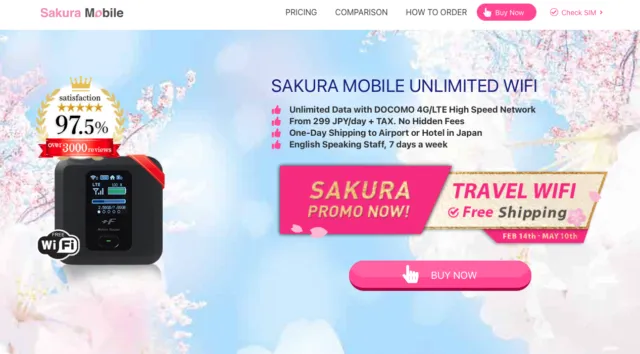
On the details that matter most for a trip through Japan, Sakura Mobile is the strongest all-around pick:
- High customer rating (4.8/5 on Trustpilot)
- Longest battery life by a wide margin—about 20 hours, compared to 5-12 hours on the other three
- A strong daily data guarantee—at least 10 GB of high-speed data every day, even under the Fair Usage Policy, so you're not left guessing how much speed you'll actually get
- The most complete English support—chat, email, and phone, 7 days a week, plus in-person help at the airport counter
- No return-trip hassle—mail the device back in a prepaid envelope, with no counter visit required
It isn't the cheapest option—X Com beats it on price, and NINJA WiFi has more physical pickup points—but it offers fewer trade-offs across the features that affect an actual day of travel.
Pocket WiFi or SIM Card? Which Is Right for You?
Traveling with a group or family→ Pocket WiFi wins here. One device connects up to 15 gadgets (5 is recommended for the best speed), so everyone shares one connection instead of buying separate SIM cards.
Traveling solo with light data speeds→ A SIM card or eSIM is usually cheaper and means one less device to carry and charge. See our Kansai Airport SIM Card Guide for options.
Heavy data user (streaming, video calls, remote work)→ Sakura Mobile's Pocket WiFi allows 10 GB of high-speed data every day, even under its Fair Use Policy—built for this kind of use. All four providers here offer unlimited data, so your choice comes down more to battery life and device count. Sakura Mobile's ~20-hour battery is the strongest fit if you're out all day without a chance to recharge.
Carrying a laptop and tablet along with your phone→ Pocket WiFi is the simplest way to get all your devices online with one connection.
Your phone is carrier-locked→ Pocket WiFi is your only real option—a SIM card or eSIM won't work on a locked phone.
Your group plans to split up during the day→ A SIM card works better here, since a Pocket WiFi ties everyone to one shared device.
Pickup and Return Locations
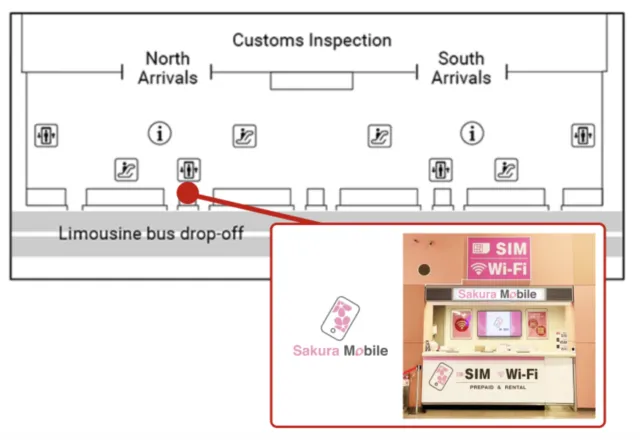
All four providers have pickup points inside Kansai Airport, mostly in Terminal 1. Here's where to find each one.
Sakura Mobile: pick up at the counter in Terminal 1, 1F, in the International Arrival Lobby. When you arrive, show your passport and order confirmation, and staff will hand you your device and a quick setup guide. When your trip is over, return by mail—just drop the device in the prepaid envelope at any Japan Post mailbox. No counter visit needed.

Landing in Terminal 2? Sakura Mobile doesn't have a counter there. Take the free shuttle bus to Terminal 1 (it runs between the Terminal 1 Aeroplaza building and Terminal 2) to reach the pickup counter—the ride is short.
NINJA WiFi: counters are available in Terminal 1, 1F (North) and Terminal 2 (International Departure Gate).
X Com (Imoto no WiFi): pickup points are in Terminal 1, 4F, and Terminal 2, 1F. Remember to book through the Imoto no WiFi website, since X Com's Japan WiFi site isn't currently operating.
Telecom Square: pickup is available in Terminal 1, 1F (Arrival Lobby) and Terminal 1, 4F (Departure Lobby).
Return steps vary slightly by provider. Check your confirmation email for exact instructions, since some use mail return and others use an airport drop box or counter.
How to Choose a Pocket WiFi at Kansai Airport

Landing in Terminal 2
If you're arriving at Kansai International Airport (KIX) Terminal 2, NINJA WiFi and X Com offer pickup locations inside the terminal. Sakura Mobile pickups are at Terminal 1, reachable by the free airport shuttle bus. Sakura Mobile also offers free delivery to hotels and other addresses in Japan.
Landing Late at Night or Very Early
If your arriving at Kansai International Airport (KIX) outside regular business hours, check counter operating times before you book. To avoid pickup issues, Sakura Mobile offers free delivery to hotels and other addresses in Japan.
Coverage Between Kansai Airport and Kyoto
Most Pocket WiFi providers offer strong coverage between KIX, Osaka, Kyoto, and Kobe. Sakura Mobile uses the docomo network, which also provides coverage across most of Japan, including destinations such as Nara and the Kii Peninsula.
Compare Advance Reservation and Same-Day Pickup
All four providers accept both advance reservations and same-day rentals. However, booking online in advance is usually less expensive and helps ensure a device is available when you arrive, especially during busy travel seasons.
Decide If You Need Unlimited Data
Before booking, check how the provider defines unlimited data. Some plans may reduce speeds after heavy usage. An unlimited or high-data plan is suitable for navigation, social media, and photo uploads, while lighter users may be able to save money with a lower-data plan.
Check What English Support Looks Like
English-language support varies by provider. Sakura Mobile and NINJA WiFi offer support by phone, email, and chat. X Com provides phone and email support, while Telecom Square uses an online contact form.
Battery Life and Device Limits
Battery life and connection limits can be important for groups and full-day sightseeing. Sakura Mobile lists up to 20 hours of battery life and supports up to 15 connected devices (though 5 is still recommended for the best speed).
A Few Practical Reminders
- Bring a charging cable or power bank.
- Return your device on time to avoid late fees.
- Review insurance options before booking if you want coverage for loss, theft, or accidental damage.
Long-Term Stays
A Pocket WiFi rental works well for most trips, even for longer vacations beyond the typical 7-14 day rental window. But if you're staying in Japan for more than 90 days, it's usually not the most cost-effective option anymore.
For stays that long, we typically recommend switching to a voice and long-term SIM plan instead—it works out cheaper over time and includes phone service, not just data.
Frequently Asked Questions

- Q1. Is there free WiFi at Kansai Airport?
Yes. Kansai Airport offers free WiFi inside the terminal buildings. The catch is that this connection ends the moment you leave the airport, which is why most travelers rent a Pocket WiFi or SIM card for the rest of their trip.
- Q2. Can I pick up my Pocket WiFi if I land at Terminal 2?
Yes. Some providers may have unmanned pickup points in Terminal 2. Other providers, like Sakura Mobile, may only have counters in Terminal 1. If you're arriving at Terminal 2, take the free shuttle bus to Terminal 1.
- Q3. What happens if I lose or damage the device?
Policies vary by provider, and most include some form of insurance or replacement fee. Check the terms at checkout, and contact your provider's support line as soon as possible if something happens to your device during your trip.
- Q4. Can multiple people share one Pocket WiFi device?
Yes. That's one of the main advantages of Pocket WiFi over a SIM card. Depending on the provider, you can connect anywhere from 5 to 15 devices to a single Pocket WiFi device at once.
- Q5. Do I need to return the device in person?
Not always. Sakura Mobile, for example, uses a mail-in return with a prepaid envelope, so there's no need to visit a counter again before you leave. Other providers may use a counter or airport drop box—check your confirmation email for your provider's exact process.
- Q6. Does the WiFi speed slow down during busy travel seasons?
It can. All four providers here offer unlimited data, but very heavy network use across a busy travel season (like cherry blossom season) can occasionally affect speed for everyone on a shared network, regardless of provider.
FAQ
The Final Word on Pocket WiFi at Kansai Airport

Choosing the right Pocket WiFi at Kansai Airport comes down to what matters most for your trip. If you want the most reliable all-around option, Sakura Mobile's unlimited data, long battery life, and all-around English support make it the easiest choice. If you're traveling on a tight budget, X Com's low daily rate may be best. And if pickup flexibility matters most, NINJA WiFi's counter and vending machines across both terminals may be the better fit.
Whichever you choose, reserve online before you fly to guarantee availability and save a bit of time and money.