Wondering how much data you’ll need for your trip to Japan? This guide will help you figure out exactly how much data you need so you can enjoy your trip without worrying about running out of data. By the end, you’ll know what plan works best for you and where to get it.
Quick Answer
From over 10 years of helping travelers stay connected in Japan, we recommend planning for 1 GB to 3 GB of data per day. Heavy streaming or video calls push that higher.

Not sure how much data you'll need?
Keep reading to find out—and see which Sakura Mobile plan is best for your trip.
How Much Data Do You Need?
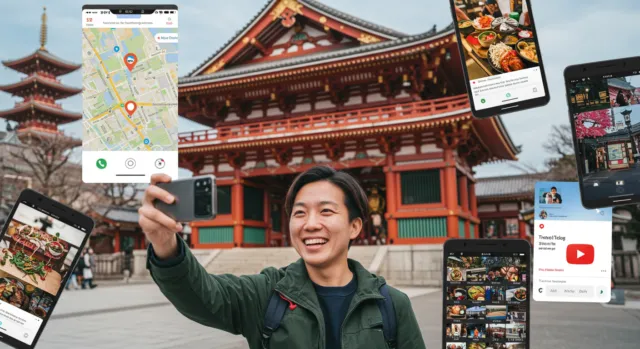
When it comes to mobile data in Japan, how much you’ll need depends on two things:
- What you plan to do
- How long you’ll be traveling
How Many GB per Day Do You Need in Japan?
Here’s a quick breakdown to help you estimate your data needs based on your travel style and trip length:
| Travel Style | Data Needed Per Week | Example Activities |
| Light User | ~1 GB | Google Maps, messaging, light browsing |
| Medium User | 1-3 GB | Social media, some video streaming, emails |
| Heavy User | 3 GB+ | YouTube, video calls, remote work |
How Much Data Do You Need for Your Whole Trip?
Now that you know your daily data usage, here’s how much you’ll need in total based on your trip length:
| Trip Length | Light User | Medium User | Heavy User |
| 3 Days | ~3 GB | 3-9 GB | 9 GB+ |
| 7 Days | ~7 GB | 7-21 GB | 21 GB+ |
| 10 Days | ~10 GB | 10-30 GB | 30 GB+ |
| 14 Days | ~14 GB | 14-42 GB | 42 GB+ |
| 30 Days | ~30 GB | 30-90 GB | 90 GB+ |
Light User
If you’re mainly using your phone to get directions, check your email, and send a few messages, you don’t need a huge data plan. For example, using Google Maps for navigation and keeping in touch through LINE or WhatsApp typically adds up to around 1 GB a day.
Medium User
If you enjoy sharing photos to Instagram, streaming a few YouTube videos, or browsing social media, you’ll want a plan with more data. For instance, if you’re posting updates on your trip and checking Facebook regularly, you’ll need about 1-3 GB a day.
Heavy User
If you plan to work remotely, make video calls, or watch videos every day, you’ll probably use a lot more data. Activities like video conferencing, streaming Netflix, or downloading large files can quickly add up to 3 GB a day or more.
Which Plan Should You Choose?
The best plan depends on your travel style, and Sakura Mobile has an option built for each one.
- Light User:Since you’re only using about 1 GB a day, a Fixed Data plan covers you without paying for data you won’t touch.
Details are on this page. - Medium User:With usage in the 1-3 GB/day range, the Unlimited eSIM with a 3 GB/day speed cap keeps you covered at a lower cost than full unlimited.
You’ll find it on this page as the 3 GB/day data eSIM. - Heavy User:Once you’re regularly past 3 GB a day, the speed cap will slow you down — so the no-cap Unlimited eSIM keeps you running at full speed.
Look for the Unlimited data eSIM on this page.
Of course, Light, Medium, and Heavy are general categories — if you’re not sure exactly where you fall, you can always check your own usage instead of guessing.
How to Estimate Your Data Usage in Japan
The amount of data depends on how you use your phone—whether it’s for navigation, social media, or streaming videos. Here’s how you can estimate your data usage based on real-world activities and check your current usage on your phone.
Start by Thinking About Your Phone Usage
The first step is to think about what you’ll do on your phone in Japan. Will you mostly use it for Google Maps, texting, and checking email? Or will you be posting on Instagram, watching YouTube, and making video calls? Each activity uses different amounts of data. Here’s a rough idea of what you might use for each:
| Activity | Estimated Data Usage |
| Using Google Maps for Navigation | ~4 MB per hour |
| Sending Text Messages | ~1 KB per message |
| Making Voice Calls | ~30 MB per hour |
| Making Video Calls | ~480 MB per hour |
| Browsing the internet | ~60 MB per hour |
| Using Social Media | ~360 MB per hour |
| Using Spotify | ~115 MB per hour (depending on sound quality) |
| Watching Netflix | ~700 MB per hour (depending on picture quality) |
| Watching YouTube | ~500 MB per hour (depending on picture quality) |
| Mobile Games | 10-100 MB per hour |
How to Check Your Data Usage on Your Phone
To get a better sense of your typical data usage, you can check your current usage on your phone. Both iPhone and Android devices have built-in tools that track your data usage. Here’s how to check it:
For iPhone Users:
- Go to Settings and tap on Cellular or Mobile Data.
- Scroll down to the Cellular Data section, where you’ll see the total data usage for the current period.
- To reset it for your trip, scroll down and tap on Reset Statistics at the beginning of your trip to track usage during your stay in Japan.
For Android Users:
- Open Settings and tap on Network & Internet, then tap on Data Usage.
- You’ll see a graph and total data used for the current period.
- If you want to check your data usage during your trip, you can reset the data counter by selecting Set Data Usage Cycle and starting a new cycle when you arrive in Japan.
Estimate Your Data Usage
Once you have an idea of your average daily usage, you can estimate how much data you’ll need for your trip. For example, if you use Google Maps for about an hour a day (about 4 MB) plus a bit of messaging (under 1 MB), and spend 30 minutes on social media (about 180 MB), that’s roughly 184 MB for the day. Multiply this by the number of days you’ll be in Japan, and you’ll have a rough idea of how much data to plan for.
If you plan on streaming videos, making video calls, or using data-heavy apps, it’s a good idea to add extra to your estimate to be safe.
Once you have your number, compare it to the Light, Medium, and Heavy User categories above to see which plan fits you best.
How Much Data for 2 Weeks in Japan?
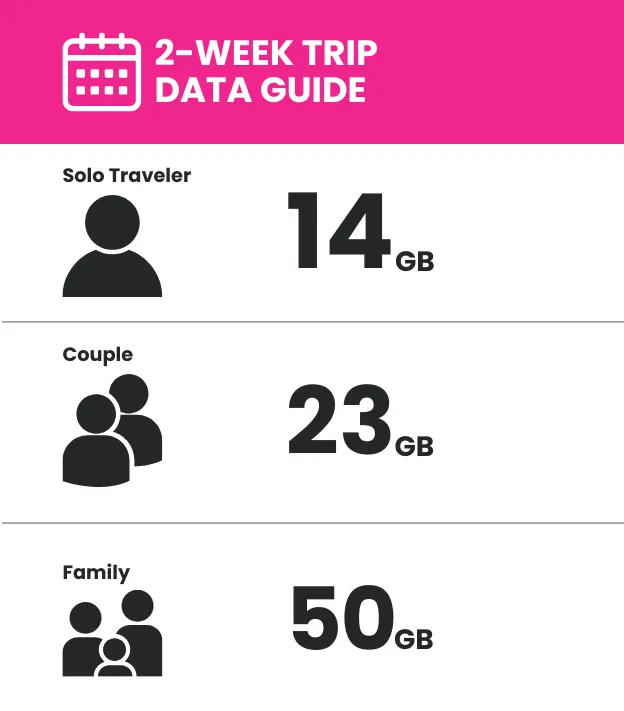
Here’s a quick guide to help you choose the right plan for a two-week trip, based on whether you’re traveling solo, with a partner, or as a family:
- Solo Traveler:If you’re keeping it simple with just navigation and messaging, about 14 GB will cover you for two weeks. This is based on the Light User estimate of roughly 1 GB a day.
- Couple:Traveling with a partner? Since navigation can be shared, you won’t need to double the data — around 23 GB covers both of you for Google Maps, messaging, and a bit of streaming or social media. That works out to a combined average of about 1.6 GB a day, with navigation shared and each person using some social media on their own.
- Family:If you’re traveling as a family, social media use adds up fast even with shared navigation — plan for about 50 GB to keep everyone connected, from Google Maps to messaging and social media across everyone’s devices. This assumes a family of four, two adults and two children, sharing navigation while each person uses social media individually.
This should give you a good idea of how much data you'll need depending on the number of people and how long you're staying. If you're unsure, an Unlimited Travel Plan could be a great choice to avoid worrying about data limits during your trip!
Sakura Mobile offers a plan for every kind of traveler, and you can also chat with our team if you need help deciding.
How to Avoid Running Out of Data in Japan
Running out of data in Japan can be a hassle, but with a few smart moves, you can easily avoid it:
- Download maps and translation apps ahead of time. Google Maps, for instance, lets you save areas offline, which is super helpful when you’re navigating without WiFi.
- Take advantage of WiFi in your hotel or Airbnb for large downloads—updates, apps, or video streaming can use a lot of data.
- If you use social media, turn off autoplay for videos. It can save a lot of data while you scroll.
- And, of course, pick a data plan that suits your usage. A Sakura Mobile eSIM or Pocket WiFi with unlimited data ensures you’re covered throughout your trip without any of the hassle.
The Best Mobile Data Options for Travelers in Japan

Choosing a mobile data plan for Japan can be a bit tricky, but with Sakura Mobile, you won’t have to worry about running out of data. Whether you opt for an eSIM/SIM or a Pocket WiFi, our plans connect you to Japan’s local carrier networks, giving you fast, reliable data across the country.
If you want to explore Japan without ever worrying about your data, the Sakura Mobile Unlimited data eSIM/SIM has no speed cap, so you can use your phone as much as you like. It's perfect for travelers who want complete freedom from data limits.
Explore our full lineup of plans and find the right fit for your trip.
What our clients have to say
Frequently Asked Questions
- Q: How much data do I need for a week in Japan?
It depends on your travel style — a week-long trip needs about 7 GB for a Light User, 7-21 GB for a Medium User, and 21 GB or more for a Heavy User. Check the "How Much Data Do You Need?" section above to see which type matches you.
- Q: What happens if I use more data than my plan allows?
It depends on the type of plan. With a fixed data plan, you may lose access or get charged extra once you hit the limit — this varies by provider. With unlimited plans that include a Fair Usage Policy (FUP), you won’t lose your connection; your speed simply slows down once you pass the daily high-speed threshold.
- Q: Is free WiFi available everywhere in Japan?
No — free WiFi in Japan is limited and inconsistent. While some train stations, cafes, and hotels offer it, coverage is patchy and often requires registration, so it’s not something you can rely on throughout your trip.
- Q: What’s the difference between an eSIM, a physical SIM, and Pocket WiFi?
An eSIM is a digital SIM built into your phone, so there’s no physical card to receive or pick up — you just scan a QR code to activate it. A physical SIM card offers the same connectivity, but it’s a physical card that needs to be inserted, unlike an eSIM. A Pocket WiFi is a small portable device that creates its own WiFi network, which is useful if you’re traveling with multiple people or devices. For a full comparison of Japan travel SIM options, see our guide to the best travel SIM cards in Japan or learn more about getting Pocket WiFi in Japan.
- Q: Is it cheaper to use a travel eSIM or SIM than my home carrier’s international roaming?
In almost all cases, yes. International roaming rates from your home carrier are typically much higher per GB than a Japan-specific travel SIM, eSIM, or Pocket WiFi plan.
- Q: How reliable is mobile data coverage across Japan?
Very reliable. Japan has some of the most extensive mobile networks in the world, with strong coverage in cities, on trains, and in most rural areas. Coverage can be weaker in remote mountain areas or some underground spaces, but this is rare.
- Q: Is it hard to set up an eSIM?
Not usually. Setting up an eSIM typically just involves scanning a QR code and following a few on-screen steps — it takes a few minutes and doesn’t require any technical knowledge.