If you're an expat, student, or long-term resident in Japan, getting internet isn't as simple as it should be. Many major carriers require long-term contracts, in-person visits, and paperwork in Japanese, which can make getting connected slow and frustrating.
Sakura Mobile's Monthly Pocket WiFi is designed for this exact situation. It offers a simple, no-contract internet solution in Japan for international residents and long-term visitors, with reliable connectivity and no language barriers.
In this guide, you'll learn how Pocket WiFi works, which plan to choose, how the network performs, and how to order.
At a Glance: Sakura Mobile Monthly Pocket WiFi
Sakura Mobile offers long-term Pocket WiFi in Japan designed for residents, expats, and students. It runs on a reliable nationwide 4G LTE network and requires no contract or Japanese credit card, making it a simple solution.
- Plans: 100 GB (5,478 yen/month) or 200 GB (7,128 yen/month)
- Performance: High-speed 4G LTE coverage across Japan
- Setup: Pre-configured device
- Devices: Connect up to 15 devices simultaneously
- Delivery: Home delivery or airport pickup (Narita, Haneda, Kansai, Fukuoka)
- Foreigner-Friendly: No local bank account required + English support
- Student Discount: 1,100 yen off activation fee
Bottom Line: A reliable, no-contract Monthly Pocket WiFi for foreigners in Japan who need fast, hassle-free internet from day one.
- At a Glance: Sakura Mobile Monthly Pocket WiFi
- What Is Sakura Mobile's Monthly Pocket WiFi?
- Sakura Mobile Monthly Pocket WiFi Plans & Pricing
- Network, Coverage & Speed
- Device Specs & Setup—What to Expect When It Arrives
- Protecting Your Device—Pocket WiFi Insurance Options
- Who Is Sakura Mobile's Monthly Pocket WiFi Best For?
- How to Receive Your Sakura Mobile Pocket WiFi
- How to Apply for the Monthly Pocket WiFi—Step-by-Step
- Sakura Mobile Monthly Pocket WiFi FAQ
- Best Long-Term Pocket WiFi in Japan for Expats & Students
What Is Sakura Mobile's Monthly Pocket WiFi?
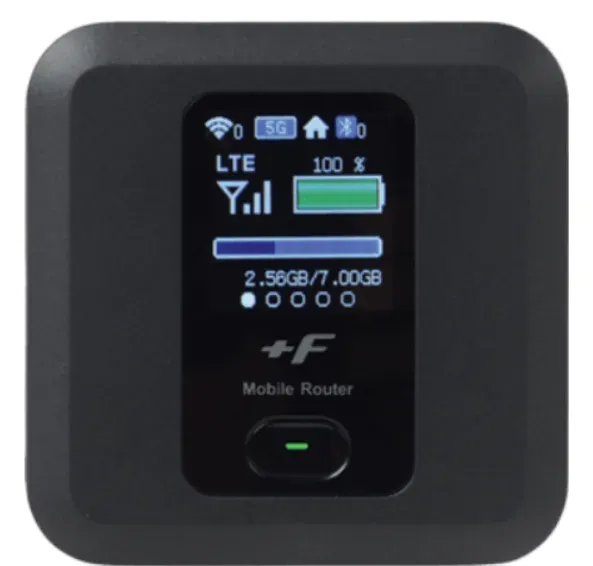
A Pocket WiFi is a small device you carry with you. It connects to Japan's mobile network and creates a personal WiFi hotspot. Your phone, laptop, tablet—anything with WiFi—connects to it just like it would at home. No cables, no wall socket, no installation.
With Sakura Mobile's Monthly Pocket WiFi, you're renting the device—not buying it. You pay a monthly fee for as long as you need it. When you're done, you return it in the prepaid envelope that comes in your package. No hardware to buy, no multi-year contract to sign.
This is different from Sakura Mobile's short-term Travel Pocket WiFi, which is made for tourists staying just a few days or weeks. The Monthly Plans are for people who need internet for a month or more—a student on a school year, an expat getting settled in a new apartment, a remote worker on a long stay.
The device comes ready to use right out of the box. Turn it on, connect your device, and you're online. No settings to change. No SIM card to install.

Quick Specs: The device is 74 x 74 x 17 mm—about the size of a drink coaster. Battery life: up to 20 hours.
Sakura Mobile Monthly Pocket WiFi Plans & Pricing
Sakura Mobile has two Monthly Pocket WiFi plans. Both use the SoftBank 4G LTE network. The only difference is how much data you get each month. Pick the one that matches how you use the internet.
| Plan | Monthly Price (excl. tax) | Monthly Price (incl. tax) | Data Capacity |
|---|---|---|---|
| 100 GB | 4,980 yen | 5,478 yen | 100 GB |
| 200 GB | 6,480 yen | 7,128 yen | 200 GB |
There is also a one-time activation fee of 5,500 yen (tax included) when you sign up. You only pay this once, no matter which plan you choose.
Ways to pay less:
- Student Discount: If you're a student, you can get 1,100 yen off the activation fee. Just upload a valid student ID when you apply and enter the coupon code studentdiscount at checkout.
- Bundle with a SIM: Order a Sakura Mobile Monthly Voice + Data SIM plan at the same time as your Pocket WiFi, and the Pocket WiFi activation fee is waived completely.

💡 Need more than 200 GB? Contact Sakura Mobile directly.
Billing & Payment Cycles
Your monthly usage fees are invoiced at the end of the following month, with payment timing determined by your chosen method:
- Credit/Debit Card: Fees are automatically charged at the end of the month following usage (e.g., March usage is charged at the end of April).
- Smart Pit (Convenience Store): Fees are invoiced at the end of the month, and are payable between the 1st and 10th of the subsequent month (e.g., March usage is payable between May 1st-10th).
| Usage Month | Billing (Invoice Sent) | Card Payment Date | Smart Pit Payment Period |
|---|---|---|---|
| January | End of February | End of February | March 1st-10th |
| February | End of March | End of March | April 1st-10th |
| March | End of April | End of April | May 1st-10th |
Order your Monthly Pocket WiFi from Sakura Mobile.
Network, Coverage & Speed
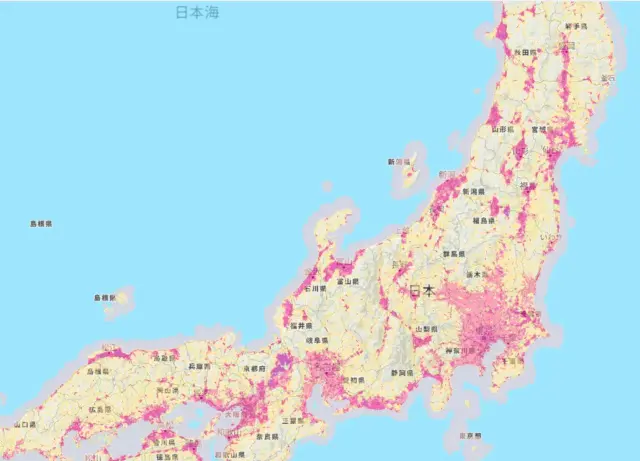
Sakura Mobile's Monthly Pocket WiFi runs on the SoftBank 4G LTE network—one of Japan's big three national networks. It covers the whole country:
- Big cities, like Tokyo, Osaka, and Sapporo
- Suburbs
- Rural areas
Some providers advertise huge speed numbers like 988 Mbps. But those are theoretical maximums—you almost never hit them in real life. What matters more is that Sakura Mobile's devices are set up to work natively on Japan's LTE network. For everyday use—video calls, streaming, working online, getting directions—4G LTE is more than fast enough.

🏠 Need unlimited home internet? The Monthly Pocket WiFi is made to be portable and flexible. If you need uncapped data for a fixed home setup, check out Sakura Mobile's Home WiFi and Fiber Internet options instead.
Device Specs & Setup—What to Expect When It Arrives
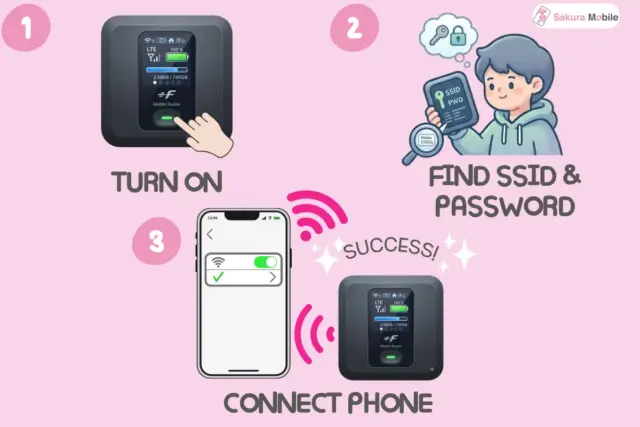
Sakura Mobile's long-term Pocket WiFi is built for portability and all-day use. The device is compact (74 x 74 x 17 mm). It fits in a jacket pocket or the front pouch of a backpack. The battery lasts up to 20 hours on a single charge—enough for a full day without plugging in. Charging it overnight is all you need.
It works with any WiFi-enabled device, including iPhones, Android phones, laptops, tablets, and game consoles. You don't need to change any settings on your phone or computer—just connect like you would to any WiFi network. The device supports up to 15 devices at the same time, so a family can share one connection while one person is on a video call, another is streaming a show, and someone else is working.
How to Connect for the First Time
- Turn it on using the button on the side.
- Find the WiFi name (SSID)—it's printed on the sticker on the back of the device.
- Enter the password (WPA Key)—also on the back sticker. Or scan the QR code to connect instantly without typing.
- That's it! You're online!
💡 The device is fully set up before it ships. There are no Japanese menus, no SIM card to insert, and no account to create on the device itself.
Protecting Your Device—Pocket WiFi Insurance Options
Sakura Mobile offers optional Pocket WiFi insurance to protect against loss or damage. Adding insurance helps reduce or eliminate replacement costs.
| Insurance Type | Monthly Cost | Coverage |
|---|---|---|
| No Insurance | 0 JPY | 0% (Full compensation applies) |
| Regular Insurance | 330 JPY | 70% of costs covered |
| Premium Insurance | 440 JPY | 100% of costs covered |
What You'd Owe for Each Item
This table shows the exact fee for each item in the set, based on your insurance level:
| Item | No Insurance | Regular (70% Covered) | Premium (100% Covered) |
|---|---|---|---|
| Pocket WiFi device | 30,000 yen | 9,000 yen | 0 yen |
| Screen only | 10,000 yen | 3,000 yen | 0 yen |
| Back cover only | 2,000 yen | 600 yen | 0 yen |
| AC adapter | 2,000 yen | 600 yen | 0 yen |
| USB Cable | 1,000 yen | 300 yen | 0 yen |
| Portable case | 1,000 yen | 300 yen | 0 yen |

Does Premium Insurance make sense? At 440 yen/month, it costs about 5,280 yen over a year. That's less than one-fifth of the 30,000 fee for a lost device. For most people, it's worth it.
You choose your insurance level when you apply. You can pick No Insurance, Regular, or Premium. You can't add insurance after a loss or damage has already happened, so choose at sign-up.
Who Is Sakura Mobile's Monthly Pocket WiFi Best For?
The Monthly Pocket WiFi is a good fit for anyone who needs internet in Japan for at least a month, wants full English support, and does not want a long carrier contract. Here are the most common situations:
🎓 International Students
Studying at a university, language school, or an exchange program? This plan is month-to-month. No Japanese bank account or credit card needed. Plus, you get a discount on the activation fee with a valid student ID.
Expats & New Residents
Just moved to Japan? Home fiber internet can take 2-4 weeks to set up. The Pocket WiFi gets you online right away with no long-term commitment. Cancel once your permanent internet is set up—or keep it.
Digital Nomads & Long-Term Visitors
Staying 1-3+ months and working remotely? SoftBank 4G LTE coverage works across Japan—from Tokyo to Kyoto to rural Hokkaido. Connect up to 15 devices. No residency paperwork needed.
How to Receive Your Sakura Mobile Pocket WiFi
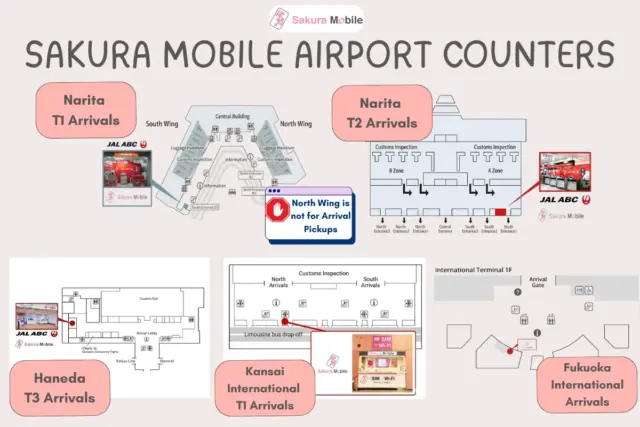
Sakura Mobile has three ways to get the device to you. All three are simple, and most need very little paperwork.
🏠 Home Delivery
Sakura Mobile ships the device to your Japanese address after your application is approved. It usually arrives in 1-3 business days. You'll get a tracking number by email when it ships.
What you need: Your residence card with your current registered address (name, address, and date of birth must match).
✈️ Airport Pickup
Pick up the device as soon as you land in Japan. Available at Narita, Haneda, Kansai, and Fukuoka airports. This is the best option if you want to be online the moment you arrive.
What you need: Your passport—no Japanese address required.
🏢 Office Pickup
Come to the Sakura Mobile office in Shinjuku to pick up in person.
What you need: Your passport.
Returning the Device
A prepaid envelope comes in your package, When you cancel or no longer need the device, simply place it in the envelop and drop it in any red Japan Post mailbox in Japan. You don't need to visit a post office.
How to Apply for the Monthly Pocket WiFi—Step-by-Step
The whole application is online and takes about 5 minutes. Unlike Japan's major carriers, Sakura Mobile doesn't need a Japanese credit card, a long-term visa, or an in-person store visit.
- Go to the Monthly Pocket WiFi order page on the Sakura Mobile website.
- Choose your plan: 100 GB (5,478 yen/mo) or 200 GB (7,128 yen/mo).
- Choose your insurance level: No insurance, Regular (330 yen/mo, 70% covered), or Premium (440 yen/mo, 100% covered).
- Choose how you want to receive the device: Home delivery, airport pickup, or office pickup.
- Enter your details and upload your ID—residence card for home delivery, passport for airport or office pickup.
- Choose how to pay: a foreign credit or debit card, or cash at a convenience store.
- Enter any discount codes: use studentdiscount if you have a valid student ID, or make sure you're bundling with a SIM to get a discounted or waived activation fee.
- Submit. You'll get a confirmation email. Your device ships and arrives in 1-3 business days.
Ready to Get Started?
Apply online in minutes—no Japanese bank account, no long-term contract.
Sakura Mobile Monthly Pocket WiFi FAQ
- Q: What are the monthly data limits, and does throttling apply?
A: Sakura Mobile's Monthly Pocket WiFi offers limits of 100 GB or 200 GB per month with no daily caps. If you exceed your monthly limit, your connection is completely suspended (cut off) rather than throttled. It will not work again until it automatically resets on the 1st of the next month.
- Q: Can I top up or buy more data if I run out?
A: No. Monthly Pocket WiFi plans do not support data top-ups. If you run out of data mid-month, our only options are:
- Upgrade your plan: Request a change via your user portal (this requires Sakura Mobile to mail you a new physical device).
- Buy a travel product: Purchase a temporary, one-off travel eSIM or tourist WiFi to get you through the rest of the month.
- Tether from your phone: Use your smartphone as a hotspot if you have a Sakura Mobile monthly phone SIM, which does support instant online data top-ups.
- Q: What payment methods are accepted, and are there any initial fees?
A: You can pay via any international credit or debit card—no Japanese bank account is required. Alternatively, you can pay in cash at Lawson, MiniStop, or a FamilyMart using the Smart Pit system.
Security Deposit (Cash Only):- Who pays? Only customers choosing cash (Smart Pit) payments.
- How much? Two months' worth of your plan fee (covers your final two bills).
- Credit/Debit Users: No deposit required.
- Q: How does the billing cycle work, and why might I get a bill after I cancel?
A: Sakura Mobile uses a postpaid system, meaning you pay for your monthly usage at the end of the following month. Because of this lag, your final invoice arrives the month after your contract ends.
- Cash (Smart Pit) Users: Your initial 2-month deposit is automatically applied to your final two bills. This ensures you do not have to make in-person convenience store payments after leaving Japan.
- Q: What is the minimum contract period?
A: There is no minimum contract period. Plans are month-to-month with no early termination fees.
- Q: What documents do I need to sign up for a monthly resident plan?
A: The requirements depend on how you receive your order:
Delivery Method Required Documents Home Delivery Valid ID showing a current Japanese address (e.g., Residence Card or My Number Card) Pickup Valid Passport. Proof of address is not required for in-person pickups.
FAQ
Best Long-Term Pocket WiFi in Japan for Expats & Students
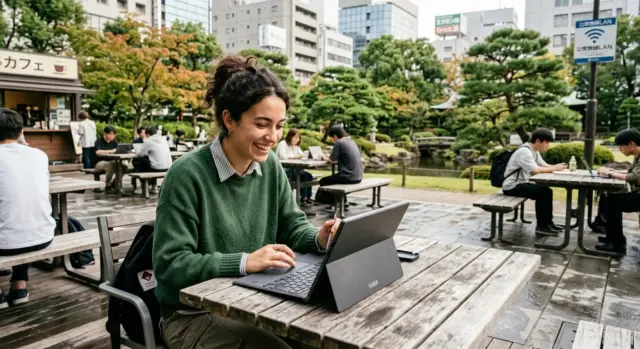
Getting online in Japan doesn't have to be complicated. Sakura Mobile's Monthly Pocket WiFi takes away the usual headaches—no long contract, no Japanese bank account, no confusing paperwork, and full English support—giving you a simple rental that works the moment it arrives.
You get the SoftBank 4G LTE network, 100 GB or 200 GB of monthly data, up to 15 devices connected at once, and English support. Add insurance when you sign up, so you're covered if anything goes wrong. Use the student discount or SIM bundle to lower your startup cost. Whether you land at the airport tomorrow, start school the next month, or just moved into a new place, the Monthly Pocket WiFi gets you connected on your own terms.
No long-term contracts. No Japanese bank account needed. Delivered to your door or ready at the airport.