You just got off a long flight at Narita Airport. Your phone has no signal. You still need to find your train, message your hotel, and map your way into Tokyo.
The airport WiFi helps for now. But it cuts out as soon as you board the train for the trip into the city, which takes an hour or more.
A Narita Airport SIM card fixes this before you leave the terminal. But Narita has three terminals and more than a dozen SIM and WiFi counters, so it's easy to lose time looking for the right one. This guide compares your options, shows where each counter is, and covers what to check before you buy.

Quick Answer: Where to Buy a SIM Card at Narita Airport
You can buy or pick up a SIM card at counters in the arrival lobbies of all three Narita terminals. Most counters are open from 7:00 AM to 9:00 PM.
- Providers: Sakura Mobile, JAL ABC, and NINJA WiFi all have staffed counters at Narita.
- Prices: Physical SIM plans start at about 3,000 yen for 5 GB. Unlimited plans start at about 4,500 yen.
- Terminal 3: Only NINJA WiFi has a counter there. The other providers are in Terminals 1 and 2.
- Tip: Booking online is usually cheaper than buying at the counter, and your SIM is reserved for you.
- Phone locked or not compatible? A Pocket WiFi device works with any phone.
- Narita Airport SIM Card Comparison: Prices, Hours, and Locations
- Which Narita SIM Card is Best for You?
- Where to Buy a SIM Card at Narita Airport
- How to Book Your SIM Card Online
- Top 3 SIM Cards at Narita Airport
- 3 Things to Look for When Choosing a SIM Card
- Will Your Phone Work With a Japanese SIM Card?
- Physical SIM Card vs. eSIM: Which Should You Choose?
- Get Connected at Narita Airport
- Narita Airport SIM Card FAQ
Narita Airport SIM Card Comparison: Prices, Hours, and Locations
Sakura Mobile, JAL ABC, and NINJA WiFi are three of the main SIM card options at Narita Airport. The table below compares their prices, plans, hours, and counter locations.
| Details | Sakura Mobile | JAL ABC | NINJA WiFi |
| Where to pick up | T1: JAL ABC counter (South Wing arrival lobby, 1F) T2: JAL ABC counter (arrival lobby, 1F) | T1: South Wing and North Wing arrival lobbies, 1F T2: Arrival lobby, 1F | T1: Central Building, 1F T2: Main Building, 1F T3: Main Building, 1F |
| Hours | Every day, 6:30 AM to 1 hour after the last international arrival | Every day, 6:30 AM to 1 hour after the last international arrival | T1: Every day, 6:30 AM to 9:30 PM T2 and T3: Everyday, 7:00 AM to 9:00 PM |
| Book online | ✅ Yes (same-day pickup available) | ❌ Physical SIMs sold at the counter only | ✅ Yes |
| English support | Every day by chat, email, and phone in person at the Shinjuku office | Not available | 24/7 |
| Network | docomo 5G / au 5G | Not listed | 24/7 |
| Coverage | 99% of Japan | Not listed | 99% of Japan |
| Data plans | Unlimited or 3GB/day | Unlimited or 5GB/10GB fixed data | Unlimited (fair use policy applies) Fixed data amounts (1 GB-30 GB) |
| Rental length | 4-31 days per SIM (up to 93 days) | Unlimited: 7, 15, or 30 days 5GB/10GB: 30 days | 1 to 60 days |
| Price | 3GB/day: from 3,850 yen Unlimited: from 4,510 yen | 5GB: 3,000 yen 10GB: 4,800 yen Unlimited: from 4,500 yen (7 days) | 10 GB for 15 days: from 4,857 yen |
| Insurance | 550 yen | Not offered | Not offered |
All prices include tax. Prices and hours were checked on October 14, 2026. Counter locations and hours come from the Narita Airport shop list.
- Pick up at the JAL ABC counter in Terminal 1 or 2, open from 6:30 AM until 1 hour after the last international arrival
- 3GB/day from 3,850 yen, or Unlimited from 4,510 yen
- No need to return the SIM after your trip.
Which Narita SIM Card is Best for You?
The best SIM card for you depends on how much data you use, when you land, and which terminal you arrive at.
- Solo travelers and light users: Sakura Mobile's 3GB/day plan (from 3,850 yen) covers maps, messaging, and some social media.
- Business travelers: Sakura Mobile's Unlimited plan has no daily speed limit, so long video calls and large file uploads won't slow you down during the workday.
- Budget travelers: JAL ABC's TRE SIM costs 3,000 yen for 5GB, valid for 30 days.
- Early or late arrivals: Sakura Mobile's pickup counters open at 6:30 AM. They stay open until 1 hour after the last international flight lands.
- Arriving in Terminal 3: NINJA WiFi has a counter in Terminal 3.
- Not sure your phone will work: Get a pocket WiFi device instead. It works with any phone that has WiFi, so you don't need to check for unlocking, SIM size, or bands.
Where to Buy a SIM Card at Narita Airport
SIM card counters are in the arrival lobbies of Terminals 1, 2, and 3 at Narita Airport. All of them are before security check, so you can reach them after you leave customs.
Where Are the Sakura Mobile Counters at Narita?
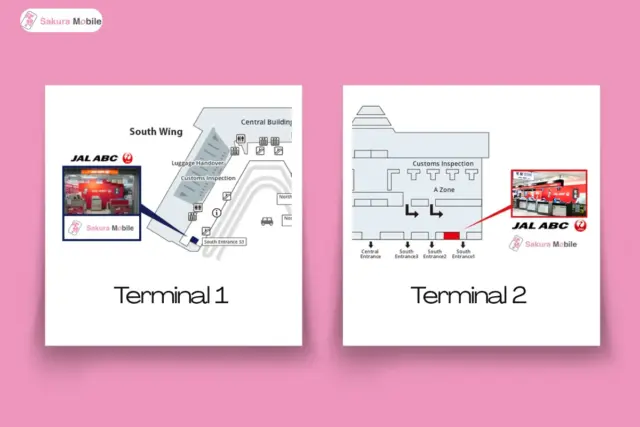
You can pick up Sakura Mobile orders at the JAL ABC counter in the arrival lobby in Terminals 1 and 2.
| Terminal | Location | Hours |
|---|---|---|
| Terminal 1 | South Wing, 1F (Arrivals), JAL ABC counter | Every day, from 6:30 AM until one hour after the last international flight arrives |
| Terminal 2 | 1F (Arrivals), JAL ABC counter | Every day, from 6:30 AM until one hour after the last international flight arrives |
| Terminal 3 | No counter | Use the Terminal 2 counter |
Counter staff hand over your SIM card, but they can't help with setup. Each SIM comes with a setup guide, and Sakura Mobile's English support team can help by chat, email, or phone. Watch the video to see how pickup works.
Landing in Terminal 3? Sakura Mobile does not have a pickup counter in Terminal 3. To get your SIM card, go to Terminal 2 by free shuttle bus or on foot.
- Free shuttle bus: Take the yellow shuttle bus from the stop outside Terminal 3. The ride to Terminal 2 takes about 3 minutes. Buses can run late in heavy traffic, so leave extra time.
- Walk: Follow the signs through the access corridor. The walk to Terminal 2 takes about 13 minutes.
Terminal 3 has no train station, so you'll need to go to Terminal 2 to catch a train into Tokyo anyway.
How to Book Your SIM Card Online
Book on the Sakura Mobile website before you fly. At checkout, choose "Narita International Airport" as your pickup spot and enter your arrival date. You'll get a confirmation email with your order number.

Forgot to book ahead? You can still buy a Sakura Mobile SIM card or eSIM, or rent a Pocket WiFi online and pick it up at the counter on the same day.
Pickup takes just a few minutes:
- Show your passport.
- Give your order number from your confirmation email.
- Get your SIM card and setup guide.
You do not need to return the SIM. Just throw it away. If you'd rather skip the airport, Sakura Mobile can deliver your SIM free to any hotel in Japan or to a friend's home. See the Sakura Mobile Pickup & Return page for details.
Other SIM and WiFi Counters at Narita
Besides the Sakura Mobile pickup counters, these arrival-level counters sell SIM cards. All are before the security check.
| Terminal and floor | Counters |
|---|---|
| T1 Central Building, 1F (arrival lobby) | AnyFone JAPAN, SoftBank Global Rental, Telecom Square, NINJA WiFi |
| T1 North Wing, 1F (arrival lobby) | JAL ABC |
| T2 Main Building, 1F (arrival lobby) | AnyFone JAPAN, SoftBank Global Rental, NINJA WiFi |
| T2, B1F (train station level) | Telecom Square |
| T3 Main Building, 1F | NINJA WiFi |
Top 3 SIM Cards at Narita Airport
Here is a closer look at each of the three main SIM card providers at Narita Airport.
👑 #1 Sakura Mobile
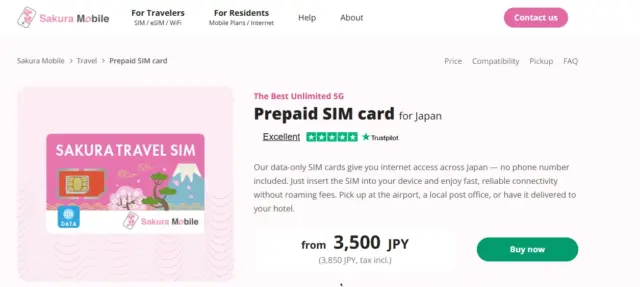
Sakura Mobile has helped travelers in Japan stay connected since 2014. It offers SIM cards, eSIMs, and Pocket WiFi. At Narita, you pick up your order at the JAL ABC counter in Terminal 1 or 2. These counters have some of the longest hours at the airport.
Key Features
- 3GB/day plan from 3,850 yen, and Unlimited plan from 4,510 yen (tax included)
- Uses the docomo and au 5G networks, which cover 99% of Japan
- Step-by-step guide included with every SIM
- Comes with an adapter that fits any SIM size
- No need to return the SIM after your trip
- English support every day by chat, email, and phone, or in person at the Shinjuku office
🥈 JAL ABC

JAL ABC is part of the Japan Airlines group. It offers luggage delivery and mobile services at major airports in Japan. At Narita, it has counters in the arrival lobbies of Terminals 1 and 2.
Key Features
- Arrival lobby counters in Terminal 1 (South Wing and North Wing) and Terminal 2
- Open from 6:30 AM until 1 hour after the last international arrival
- Unlimited Japan Prepaid SIM: 4,500 yen for 7 days, 6,000 yen for 15 days, or 7,000 yen for 30 days
- TRE SIM Data: 3,000 yen for 5GB or 4,800 yen for 10 GB, valid for 30 days
- Fits any phone (nano, micro, and standard sizes in one card)
- Physical SIMs are sold at the counter, not online
🥉 NINJA WiFi (Shogun SIM)
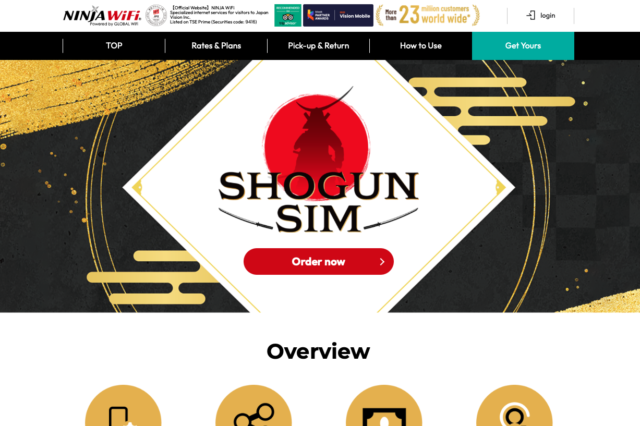
NINJA WiFi sells SIM cards and Pocket WiFi. It is the only one of the three with a counter in all three Narita terminals. That makes it handy if you land in Terminal 3.
Key Features
- Counters in Terminals 1, 2, and 3
- Book online by 4:00 PM Japan time the day before for Terminal 1 pickup, or up to the day of pickup for Terminals 2 and 3.
- Unlimited data (fair usage policy applies)
- Flexible rental lengths
3 Things to Look for When Choosing a SIM Card
When you choose a SIM card for Japan, check three things: online booking, enough data, and English support.
1. Can You Book Online?
Booking online is usually cheaper than buying at the counter. Your SIM is also set aside for you. This matters most in busy seasons, like cherry blossom season (March to April) and fall leaf season (October to November), when counters can run out.
Booking ahead also means one less thing to worry about after a long flight. You won't have to compare plans at the counter while you're tired, so you can get online and on your way faster.
2. Is There Enough Data?
Free WiFi in Japan is hard to find outside tourist areas. Most trains and rural areas don't have it. Maps, translation apps, and video calls use data fast, so pick a plan with room to spare.
| Travel Style | Data Needed Per Week | Example Activities |
| Light User | ~1 GB | Google Maps, messaging, light browsing |
| Medium User | 1-3 GB | Social media, some video streaming, emails |
| Heavy User | 3 GB+ | YouTube, video calls, remote work |
3. Is English Support Available?
If your SIM won't connect, English support makes a big difference. Look for a provider you can reach in more than one way. Sakura Mobile offers support every day by chat, email, and phone, or in person at its Shinjuku office.
Will Your Phone Work With a Japanese SIM Card?
Your phone will work with a Japanese SIM card if its unlocked, take the right SIM size, and supports Japan's network bands. Check all three before you book.
- Unlocked: A locked phone can't use SIM cards from other carriers. Ask your carrier before you travel. Most can unlock a phone remotely.
- SIM size: Phones use standard, micro, or nano SIMs. Sakura Mobile SIM cards come with a free adapter, so any size works.
- Network bands: Check that your phone supports the band for your plan's network.
| Network | Sakura Mobile plan | 4G LTE bands | 5G bands |
|---|---|---|---|
| docomo | 3GB/day | Band 1 (main) Band 19 (support) | n78, n79 (main) n1, n28 (support) |
| au (KDDI) | Unlimited | Band 1 (main) Band 18 (support) | n77, n78 (main) n3, n28 (support) |
If you're not sure, contact Sakura Mobile support or check the device compatibility page.
If you can't confirm all three before your trip, a Pocket WiFi device is the safer choice.
And if your phone turns out not to work, Sakura Mobile's SIM insurance lets you get a refund or switch to a Pocket WiFi.
Physical SIM Card vs. eSIM: Which Should You Choose?
A physical SIM card is best if your phone doesn't support eSIM. An eSIM is best if you want to be online the moment you land, with no counter visit.
| Features | Physical SIM | eSIM |
|---|---|---|
| Setup | Swap the card in at the airport | Scan a QR code to install before you fly |
| Data starts | Right after you insert and set it up | Ready to use when you arrive, if installed in advance |
| Device needed | Any phone with a SIM tray and unlocked | An eSIM-capable, unlocked phone |
| Pickup | JAL ABC counter, Terminal 1 or 2 | Nothing to pick up |
| After your trip | Throw it away | Nothing to remove or dispose of |
A physical SIM card works well if you:
- Have an older phone that doesn't support eSIM
- Prefer a physical card over a digital setup
- Want to be able to take the SIM out and put it back in
An eSIM works well if you:
- Have a newer phone, including US iPhones that no longer take physical SIM cards
- Want to be online the moment you land
- Are landing in Terminal 3 or outside counter hours
Sakura Mobile's physical SIM cards are data only. If you need a Japanese phone number, Sakura Mobile also offers a 3GB/day + calls eSIM from 6,160 yen (tax included). It runs on au 5G and includes a Japanese phone number. An in-person ID check is required.
With a data-only plan, you can still call and text using apps like WhatsApp, LINE, iMessage, and FaceTime.
Get Connected at Narita Airport
Picking the right Narita Airport SIM card comes down to two things. First, make sure your phone can use a Japanese SIM. Then pick the provider and plan that matches your trip.
If you want longer counter hours, English support every day, and no SIM to return, Sakura Mobile is worth a look. Book online before you fly to save money and make sure your SIM is waiting when you land.
Narita Airport SIM Card FAQ
- Q1. Where can I buy a SIM card at Narita Airport?
You can buy or pick up a SIM card at counters in the arrival lobbies of Terminals 1, 2, and 3. Most counters are open from 7:00 AM to 9:00 PM. Sakura Mobile orders are picked up at the JAL ABC counter in Terminal 1 (South Wing) or Terminal 2.
- Q2. How much does a SIM card cost at Narita Airport?
Sakura Mobile SIM cards start at 3,850 yen for 3GB/day and 4,510 yen for Unlimited plans, tax included. JAL ABC sells a 5 GB SIM for 3,000 yen and unlimited SIMs from 4,500 yen for 7 days. NINJA WiFi plans start at 4,857 yen for 10 GB over 15 days.
- Q3. Can I buy a SIM card at Narita Terminal 3?
Yes. NINJA WiFi has a counter on the first floor of Terminal 3. Sakura Mobile pickup is in Terminals 1 and 2, so if you land in Terminal 3, take the free shuttle bus (about 3 minutes) or walk (about 13 minutes) to Terminal 2.
- Q4. What if my flight lands late at night?
Sakura Mobile's pickup counters stay open until 1 hour after the last international flight lands. To avoid the risk of missing counter hours, have your SIM delivered free to your hotel, or order an eSIM.
- Q5. I forgot to book a SIM card. Can I still order one on the day I arrive?
Yes. You can order a Sakura Mobile SIM card, eSIM, or Pocket WiFi online and pick it up at the JAL ABC counter in Terminal 1 or 2 on the same day.
- Q6. Can I get a SIM card with a Japanese phone number?
No. Sakura Mobile's physical SIM cards are data only. If you need a Japanese phone number, choose the 3GB/day + calls eSIM (6,160 yen, tax included), which requires an in-person ID check at one of our Narita Airport counters.
- Q7. What does "unlimited data" mean?
It depends on the plan. A truly unlimited plan never slows down, no matter how much data you use. Sakura Mobile's au Unlimited plan works this way. Many other "unlimited" plans have a fair use policy (FUP), which slows your speed after heavy use. Check the plan details before you buy.
- Q8. What should I do if my SIM card stops working?
First, check that the mobile data is on and the right SIM is selected for data. Then check your APN settings and that the card is in properly, and restart your phone. If it still doesn't work, contact Sakura Mobile support with your phone model and screenshots of your settings.