You've landed in Japan. That's exciting, but a big airport can feel like a lot after a long flight. You may be wondering how to get around without speaking Japanese, how to get online, and whether your phone will work.
At Sakura Mobile, we help travelers get connected at Narita every day, so we know where people get stuck. This guide covers which terminal is yours, how to get online, how to reach Tokyo, and where to pick up a SIM card or Pocket WiFi.

Flying into a different airport?
See our guide to Haneda Airport, Kansai Airport, and Fukuoka Airport.

TL;DR
- Terminals: Narita has three terminals. Terminal 1 and Terminal 2 serve full-service airlines, and Terminal 3 serves low-cost carriers. Terminals are split by airline group, not by domestic or international.
- Free WiFi: Yes. Connect to FreeWiFi-NARITA. It works for quick messages, but not for a full day of maps and apps.
- Sakura Mobile counters: Terminal 1 South Wing (1F) and Terminal 2 (1F). There is no counter in Terminal 3.
- Order ahead: You can now order SIMs, Pocket WiFi, and eSIMs at both Sakura Mobile counters for same-day pickup. But stock is limited, so ordering online ahead of time guarantees your connection, and it's usually cheaper too.
- To Tokyo: Trains are the fastest option. Buses work well with lots of luggage.
- Not Sure You're at the Right Airport?
- Before You Land: Visit Japan Web
- Narita Airport WiFi
- IC Cards: Suica, PASMO & Welcome Suica
- SIM, eSIM & Pocket WiFi at Narita
- Which Network Does Sakura Mobile Use?
- Recharging Spots
- Information Counters & Luggage Services
- Transportation: Getting Around & Into the City
- Narita Airport Terminals: Which One Is Yours?
- Terminal 1 Guide
- Where to Shop & Eat
- Nearby Attractions
- Get Your Sakura Mobile SIM, eSIM, or Pocket WiFi at NRT
Not Sure You're at the Right Airport?
Tokyo has two main airports. Here is how they compare.
| Narita (NRT) | Haneda (HND) | |
|---|---|---|
| Location | Chiba Prefecture, next to Tokyo | Inside Tokyo |
| Distance to central Tokyo | About 60 km | About 25 km |
| Best known for | Many international flights (including low-cost carriers) | Many domestic flights (plus more international flights each year) |
Is Narita Airport in Tokyo? No. It is in Chiba Prefecture. Plan on about an hour or more to reach central Tokyo.
Before You Land: Visit Japan Web
Visit Japan Web is a free government website. You enter your immigration and customs information before you fly, and you get a QR code that can speed up your arrival.
- Go to https://www.vjw.digital.go.jp and create an account.
- Add your passport details, flight information, and where you're staying.
- Complete both the immigration and customs sections. They combine into one QR code.
- Finish a few hours before you land, then screenshot your sections.
- At Narita, use the QR code at the kiosks instead of filling out paper forms.
Is it required? No. Paper forms are still handed out and accepted. But signing up takes about 10-15 minutes and can save you time in a busy line.
Shopping tax-free? Automated gates may not stamp your passport, but you need an entry stamp to shop tax-free. If you plan to shop, ask an officer to stamp it.
Narita Airport WiFi
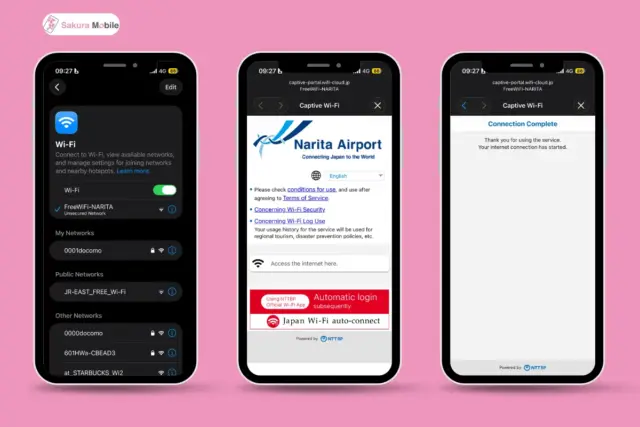
Does Narita Airport have free WiFi? Yes. Connect to FreeWiFi-NARITA. Free WiFi is available throughout the airport.
- Open your phone's settings and turn WiFi on.
- Choose FreeWiFi-NARITA.
- Agree to the Terms of Service on the screen that appears.
- Tap "Access the internet here," and you're connected.
The airport WiFi is great for texting family or checking a map. It can be slow in crowded areas, and it stops working once you leave the building. For navigation, translation, and rides, a SIM card, eSIM, or Pocket WiFi is more reliable.
Free internet is available throughout the airport, so you can get online in any terminal.
IC Cards: Suica, PASMO & Welcome Suica
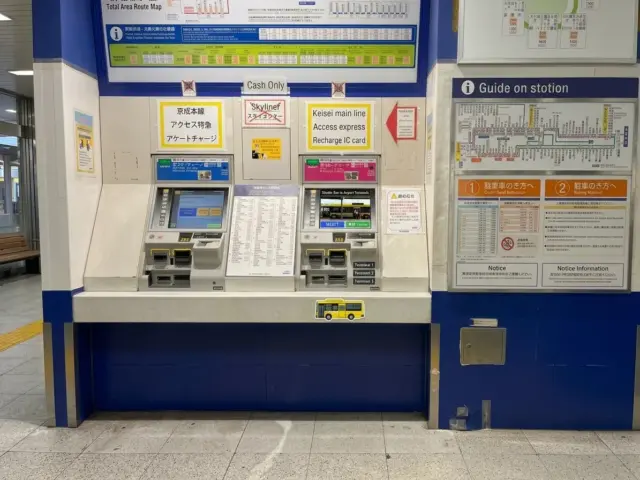
An IC card is a rechargeable card for trains, buses, vending machines, and many shops. Tap it, and you're through.
- Suica or PASMO: Buy one at a station before the ticket gates. A standard card costs about 500 yen as a deposit, plus the amount you add. You can return it at a station for the deposit and balance.
- Welcome Suica or Welcome PASMO: Made for visitors, and the balance can't be refunded. Welcome Suica has no deposit and comes in 1,000-10,000-yen amounts. Welcome PASMO (Tourist PASMO) costs about 2,000 yen, lasts 28 days, and is sold at the Skyliner & Keisei Information Center in the Terminal 1 or Terminal 2 Station.
- On your phone: iPhone users can add Suica to Apple Wallet. Most foreign Android phones can't use Suica, so a physical card is easier.
SIM, eSIM & Pocket WiFi at Narita
If you want reliable data for your whole trip, pick one of these before you leave the airport:
- Pocket WiFi: A small device that makes its own hotspot. Good for groups and multiple devices.
- Physical SIM card: Goes into your phone's SIM slot. Good if your phone doesn't support eSIM.
- eSIM: Installs digitally with a QR code, with no card to swap. Good for solo travelers who want the fastest setup.
- Voice + Data eSIM: Includes a Japanese phone number. Useful for calling restaurants or receiving SMS codes.
| If you're... | Best option |
| Looking for the fastest setup | eSIM |
| Traveling with multiple devices | Pocket WiFi (one hotspot, share the connection) |
| Using a phone that doesn't support eSIM | Physical SIM card |
| Needing a Japanese phone number for calls | Voice + Data SIM/eSIM |
Pickup in one line: Terminal 1 South Wing 1F and Terminal 2 1F, every day from 6:30 AM until one hour after the last international flight arrives.
Good to know:
- Order online first. It guarantees your connection is ready when you land, and it's usually cheaper than buying at the counter.
- Same-day orders are available, too. Both Sakura Mobile counters (Terminal 1 South Wing and Terminal 2) can help with SIM cards, Pocket WiFi, and eSIMs. Stock is limited, so your plan isn't guaranteed if you don't order ahead.
- Data-only travel eSIMs need no pickup. You get a QR code by email, and can activate it in about 5 minutes.
- Prepaid SIMs sold at airports can cost more, and some may not work with every phone. Check our compatibility page before you order.
Want to compare providers? See our guides to Narita Airport SIM cards and Narita Airport Pocket WiFi.
Which Network Does Sakura Mobile Use?
Sakura Mobile uses two of Japan's major networks, depending on your plan:
- Unlimited data eSIM/SIM: au
- 3GB/day eSIM/SIM plans: docomo
- 3GB/day Voice + Data eSIM: au
- 4G LTE Pocket WiFi: docomo
Planning day trips outside Tokyo? Coverage can vary by area. See our network comparison guide for details.
Recharging Spots
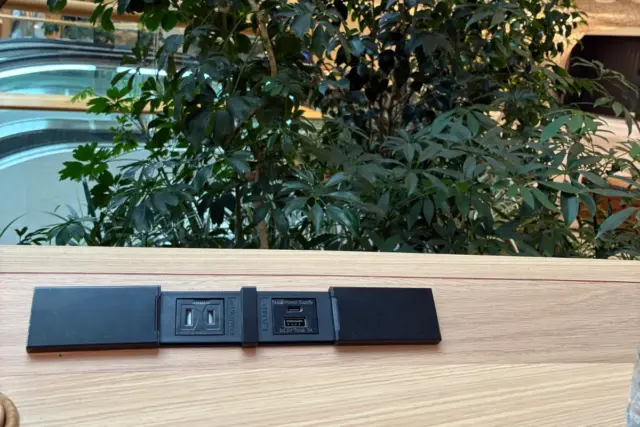
Need to charge your phone after a long flight? Free charging is available throughout the airport, in all three terminals.
- Visitors service centers
- Flight departure gates
- Lounge areas for airline members
- Airport cafes
- SHIKISAI GARDEN
Information Counters & Luggage Services
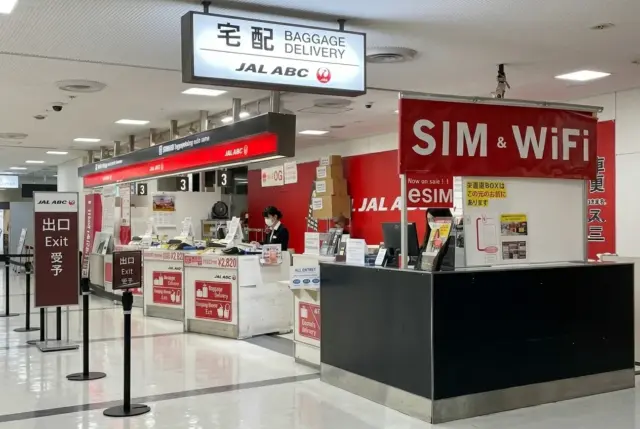
Information counters: Staff at the information counters can help with flights, trains, buses, and directions. Most speak English. You can also use Infotouch kiosks, which are multilingual touchscreens. Note that information counters can't set up mobile data for you. For that, head to the Sakura Mobile counter.
Currency exchange and ATMs: Machines and counters are in the arrivals and departures areas. Check the sign for hours.
Luggage delivery: Don't drag a heavy suitcase onto a crowded train. JAL ABC and Yamato counters can send your bags to your hotel on the same day.
| Details | JAL ABC | Yamato |
|---|---|---|
| Price | 4,500 yen per bag | Depends on bag size and delivery address |
| Drop-off deadline | 2:00 PM | 10:30 AM (about 9:50 AM at the Terminal 3 1F counter) |
| Hotel delivery | By 10:00 PM | About 6:00 PM to 9:00 PM |
| Delivery areas | Tokyo's 23 wards & Urayasu City in Chiba | Ibaraki, Tochigi, Gunma, Saitama, Chiba, Tokyo, Kanagawa, and Yamanashi |
| Counters | Terminal 2, 1F arrival counter. Terminal 1 South Wing counter by advance reservation only. | 1F (arrivals) in Terminal 1 North Wing, Terminal 1 South Wing. 4F in Terminal 1 (both wings) and 3F in Terminal 2 (departures). All are before security. |
| Counter hours | 6:30 AM to 2:00 PM | 1F counters: 6:30 AM to 10:30 PM (open one hour after the last flight if it lands after 10:30 PM). 4F and 3F counters: 7:00 AM to 9:00 PM |
JAL ABC has a flat price and covers central Tokyo. Yamato covers more areas, but the price changes with your bag size and destination.

Lockers and storage: Coin lockers are available throughout the airport. Small lockers cost 400 yen, medium lockers cost 600 yen, and large lockers cost 800 yen.
Transportation: Getting Around & Into the City
Getting Between Terminals
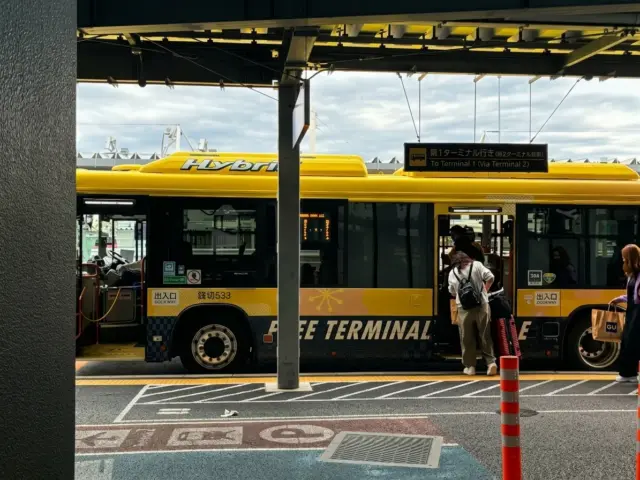
The easiest way to move between terminals is the free yellow shuttle bus. Look for the shuttle stop signs at each terminal.
Be sure to leave extra time. Buses can be late or canceled in heavy traffic, and there is no compensation if that makes you miss a flight or train.
There are three shuttle routes:
| Shuttle | Ride time |
|---|---|
| All terminals (stops in this order: Terminal 1, Terminal 3, Terminal 2) | Terminal 1 to Terminal 3: about 14 min. Terminal 3 to Terminal 2: about 3 min. Terminal 2 to Terminal 1: about 10 min |
| Terminal 1 and Terminal 2 only | About 10 min each way |
| Terminal 2 and Terminal 3 only | Terminal 2 to Terminal 3: about 6 min. Terminal 3 to Terminal 2: about 3 min. |
Terminal 2 to Terminal 3: Walk or Shuttle?
You can walk between Terminal 2 and Terminal 3 using the access corridor. It takes about 13 minutes from the ticket gates at Airport Terminal 2 Station to the information counter (1F) to the Terminal 3 Departure Lobby (2F). The walk from the Terminal 3 Arrival Lobby Information counter (1F) to the Terminal 2 Station ticket gates takes about the same time. This is an estimate, so leave plenty of extra time. Follow the signs and take the escalator outside to the second floor.
If you have a lot of bags or the weather is bad, take the shuttle bus. The ride only takes about 3 to 6 minutes.
Terminal 3 has no train station. To catch a train, walk or take the shuttle to Terminal 2.
Getting From Narita Airport to Tokyo
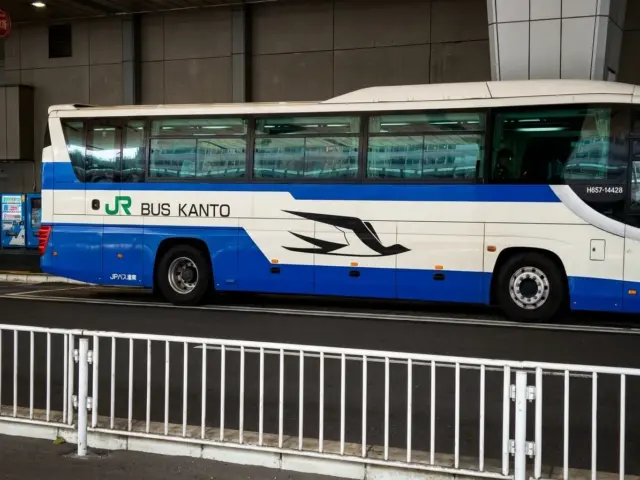
Narita is about 60 minutes or more from central Tokyo. Your best choice depends on your budget, your bags, and when you land.
| Option | Goes to | Time | One-way fare | Best for |
| Keisei Skyliner | Nippori, Ueno | 36-66 min | 2,590 yen (~16 USD) | Speed |
| JR Narita Express (N'EX) | Tokyo Station, Shinjuku, Shibuya, Shinagawa | 53-90 min | 3,140-5,310 yen (~19-33 USD) | Comfort |
| Keisei Access Express | Nippori, Ueno, Asakusa, Shinagawa, | 55-101 min | 1,240-1,520 yen (~8-9 USD) | Budget |
| Airport Limousine Bus | Major areas in Tokyo | 70-90 min | 3,100-3,600 yen (~19-22 USD) | Comfort, heavy luggage |
| Low-Cost Bus | Major areas in Tokyo | 70-120 min | 1,400-2,300 yen (~9-14 USD) | Budget |
| Standard Taxi | Any destination | Varies | Varies | Flexibility |
Fares and times change by destination, ticket type, and traffic. USD amounts are approximate.
Good to know:
- The train stations are on B1F of Terminal 1 and Terminal 2. Terminal 3 has no station on its own.
- JR and Keisei use separate ticket gates. Check which line you need before you land.
- Late flights have fewer options. Check the last departure time before you land.
For more details, see our guide to getting from Narita Airport to Tokyo.
Narita Airport Terminals: Which One Is Yours?
Narita has three terminals. Terminals are grouped by airline alliances, so each one handles both domestic and international flights.
| Terminal | Main airlines |
|---|---|
| Terminal 1 North Wing | SkyTeam (such as Delta, AirFrance, Korean Air) |
| Terminal 1 South Wing | Star Alliance (such as United, ANA, Lufthansa) |
| Terminal 2 | Oneworld (such as American Airlines, Japan Airlines, British Airways) |
| Terminal 3 | Low-cost carriers (such as Jetstar and Spring) |
A few low-cost airlines use Terminal 1 instead. Peach and Zipair are examples, so always check your ticket before you leave for the airport.
Terminal 1 Guide
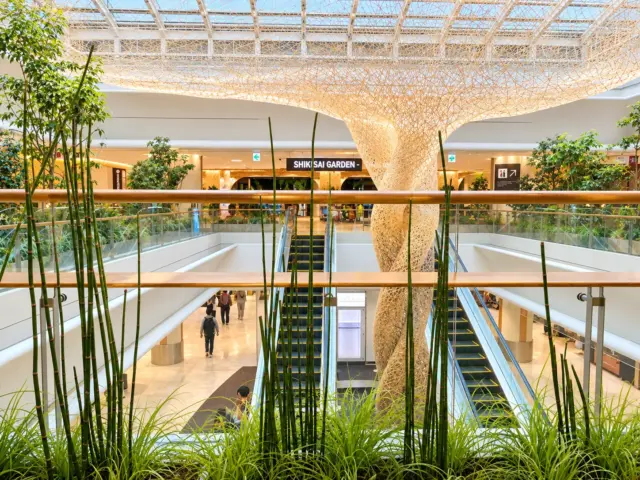
Terminal 1 is the biggest terminal. It has a North Wing, a Central Building, and a South Wing. Here is where to find things:
| Floor | What's there |
|---|---|
| B1F | Train station |
| 1F | Arrivals, Sakura Mobile counter (South Wing), buses, taxis, currency exchange, information desk |
| 2F | Showers, Support Center |
| 4F | Departures and check-in, Airport Mall (before security) |
| 5F | SHIKISAI GARDEN, food court, observation deck, massage chairs |
Don't miss SHIKISAI GARDEN (5F): This calm space is inspired by Japan's four seasons.
You can sit on tatami mats, rest on a sofa, or find a desk with outlets to work. There is also a digital art area, and it's a nice place to slow down before a flight.
More fun stops: The Nintendo Check-In area lets you try games and pose with Mario. It's open from 10:30 AM to 5:30 PM. The Pokemon Store is in the South Wing on 4F, and the Airport Mall has souvenirs, snacks, and character stores.
Terminal 2 Guide
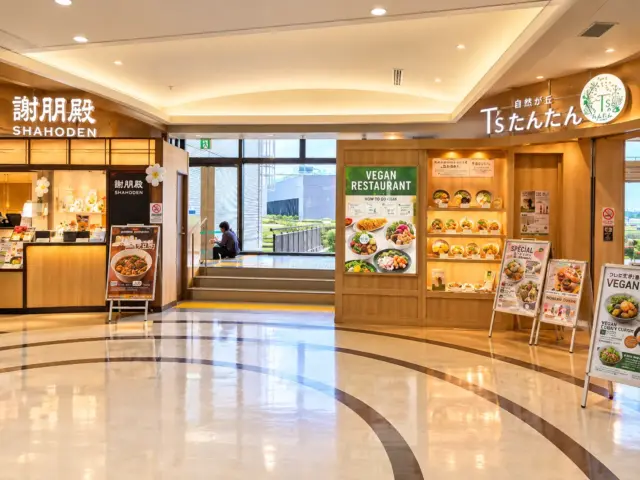
Terminal 2 serves full-service airlines in the Oneworld group. Most shops and restaurants are on the 4th floor, before security.
- Shopping: MUJI to GO and Travel Shop Milesto for travel goods, Itoya for pens, notebooks, and paper goods, and snack stores for gifts.
- Rest options: The Nine Hours capsule hotel is in Terminal 2, before security. Showers are open 24 hours (1,000 yen for up to 1 hour). Room prices depend on gender and the day. On an international layover, go through immigration first.
Terminal 3 Guide
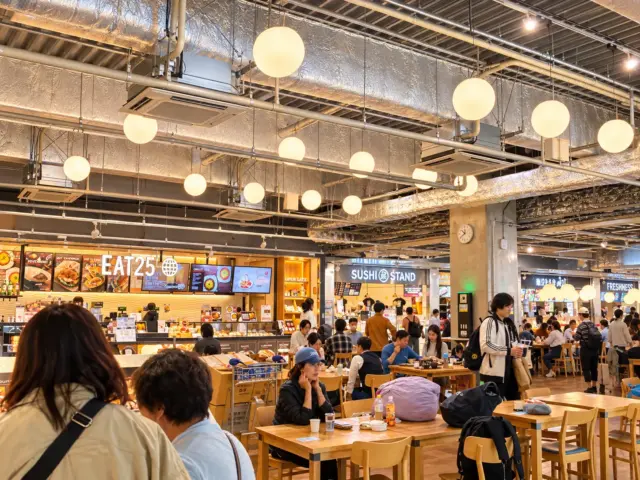
Terminal 3 is for low-cost airlines. It is simple and quick to walk through. You'll find a food court with affordable meals, a few shops and souvenir stands, and a gacha area. There is also a Yamato luggage counter on 1F, with an earlier drop-off deadline.
Important: There is no Sakura Mobile counter in Terminal 3. Pickup at Terminal 2 and return Pocket WiFi at the mailbox near the Terminal 3 food court.
Where to Shop & Eat
You don't need to plan every meal. Here's where to look.
- Terminal 1: The Airport Mall on 4F and the food court on 5F have the widest choice. Tonkatsu, noodles, and sushi are popular.
- Terminal 2: Most restaurants are on 4F, but some are on other floors. You'll find sushi, soba, and cafes.
- Terminal 3: A food court with simple, affordable meals.
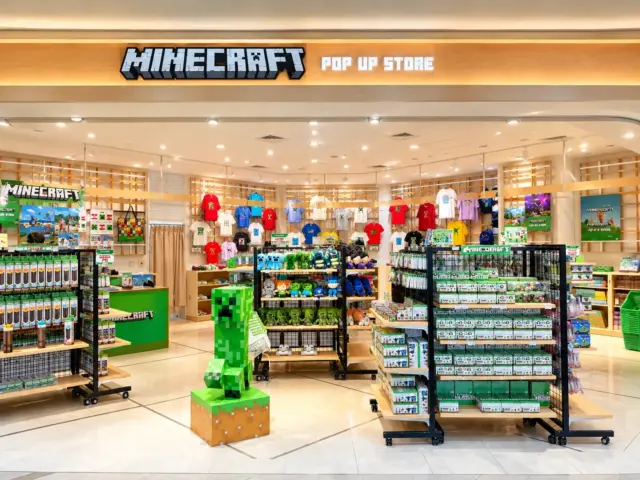
- Limited-time pop-ups: The airport sometimes hosts pop-up shops. Right now, look for the Minecraft pop-up store located in Terminal 2. Pop-ups don't last long, so check the signs when you arrive.
- Souvenir and gifts: Look for Japanese snacks, tea, and anime goods. Gacha capsule toy machines are a fun way to use up spare coins, and you'll find them in all three terminals.
Shopping tax-free? Remember that you need an entry stamp in your passport, and that rules change November 1, 2026.
Nearby Attractions
Have a few extra hours? Here are easy ideas near the airport.
- Naritasan Shinsho-ji Temple: A large temple with shops and cafes, about 30 minutes by train.
- Nine Hours Capsule Hotel (Terminal 2): Rest or shower between flights. Showers cost 1,000 yen for up to 1 hour.
- Observation decks: Watch planes take off at Terminal 1 and Terminal 2.
Get Your Sakura Mobile SIM, eSIM, or Pocket WiFi at NRT
| Terminal | Location | Hours |
|---|---|---|
| Terminal 1 | South Wing, 1F (Arrivals), JAL ABC counter | Every day, from 6:30 AM until one hour after the last international flight arrives |
| Terminal 2 | 1F (Arrivals), JAL ABC counter | Every day, from 6:30 AM until one hour after the last international flight arrives |
| Terminal 3 | No counter | Use the Terminal 2 counter |
Please note:
- Orders cannot be picked up at the Terminal 1 North Wing JAL ABC counter. Use the South Wing counter.
- Same-day orders are available at both counters for all Travel products (SIM, Pocket WiFi, and eSIM). Stock is limited, so order online first to guarantee your connection. It's usually cheaper too.
- To get from Terminal 3 to Terminal 2, walk or take the free shuttle bus.
- You can return a Pocket WiFi by mail. Use the mailbox near the Terminal 3 food court, or any Japanese mailbox with the envelope in your package.
What Makes Sakura Mobile Different?
- Full English support before, during, and after your trip
- Online ordering and flexible plans for short or long stays (order ahead to secure your plan, usually at a lower price)
- eSIM option: activate in minutes with a QR code, no pickup
- Delivery option: get your SIM or Pocket WiFi sent to your hotel
- Easy returns: drop your Pocket WiFi in any Japanese mailbox with the envelope provided
- No contract and no activation fee
- Q1. Does Narita Airport have free WiFi?
Yes. Connect to FreeWiFi-NARITA and agree to the terms of service. It's good for quick tasks, but not a full day of maps and apps.
- Q2. Is Narita Airport in Tokyo?
No. It's in Chiba Prefecture. Plan on about an hour or more to reach central Tokyo.
- Q3. Which terminal does my airline use at Narita?
It depends on the airline group. Terminal 1 has two wings (North for SkyTeam, South for Star Alliance), Terminal 2 serves Oneworld, and Terminal 3 serves low-cost carriers. Check your ticket, since a few airlines are exceptions.
- Q4. How do I get from Terminal 2 to Terminal 3?
Walk through the access corridor (about 13 minutes from the Terminal 2 Station ticket gates to the Terminal 3 information counter) or take the free shuttle bus, which takes about 3 to 6 minutes.
- Q5. Where is the Sakura Mobile counter at Narita Airport?
Terminal 1 South Wing 1F and Terminal 2 1F. There is no counter in Terminal 3.
- Q6. Can I buy a SIM card at Narita Airport?
Yes. You can buy SIM cards at some airport shops and machines. Both Sakura Mobile counters (Terminal 1 South Wing and Terminal 2) can also help with same-day orders for SIM cards, Pocket WiFi, and eSIMs. Stock is limited, though. Ordering online first guarantees your connection, and it's usually cheaper.
- Q7. What's the fastest way to get from Narita to central Tokyo?
Trains. The Keisei Skyliner and the JR Narita Express are the quickest. Buses work well if you have a lot of luggage.
- Q8. Do I need Visit Japan Web?
No, it's optional. Paper forms are still accepted. But signing up ahead of time can save you a wait.